CRM Automation 12 min read
How CRM Automation Stops Leads Slipping Through the Cracks
Most CRMs store lead data. An automated CRM records every enquiry, assigns an owner, moves the pipeline and starts follow-up, so leads stop disappearing between steps.
On this page
A lead fills in your form on Tuesday evening. The notification lands in a shared inbox, someone means to add it to the CRM on Wednesday, and by Friday nobody is sure whether anyone called back. The lead did not go cold. It went missing.
CRM automation is how you stop that happening. It uses rules inside your CRM to create the record, tag the source, assign an owner, move the pipeline stage and start follow-up the moment something happens, so no enquiry depends on a person remembering the next step.
CRM automation is the use of triggers and rules inside a CRM to handle lead management automatically: creating contacts from every lead source, recording where each lead came from, assigning an owner, moving pipeline stages when a lead replies or books, starting follow-up, and flagging leads that stall. It stops leads getting lost by removing the manual steps where they usually fall through, and it makes pipeline data accurate enough to report on.
Why a passive CRM loses leads
Most service businesses already pay for a CRM. The problem is how it runs. In a passive CRM, every record exists because someone typed it in, every stage is correct only if someone dragged the card, and every follow-up happens only if someone checked. The software stores history. It does not act.
That holds up at five enquiries a week. It stops holding up when leads arrive from a website form, Facebook lead ads, Google Ads landing pages, phone calls and referrals at the same time, and the people responsible for logging them are also answering the phone, running jobs or seeing clients.
This is where a passive CRM breaks:
- 01Leads never enter the CRM A form notification is read on a phone and answered from a personal inbox. The CRM never hears about it.
- 02Stages are updated days late The pipeline shows where leads were at the last admin session, not where they are now.
- 03Nobody owns the lead A shared inbox means everyone can see the enquiry and no one is responsible for it.
- 04Neglected and uninterested leads look the same A lead who went quiet after a call and a lead nobody called both sit in the same stage.
- 05Reports cannot be trusted Source, stage and outcome data is incomplete, so decisions about ad spend are guesses.
This is not a people problem. It is a process problem: too many steps depend on someone remembering them.
An automated CRM turns those steps into rules. The rest of this guide covers which rules matter, how to design a pipeline they can run on, and where setups usually go wrong.
What CRM automation is and how it works
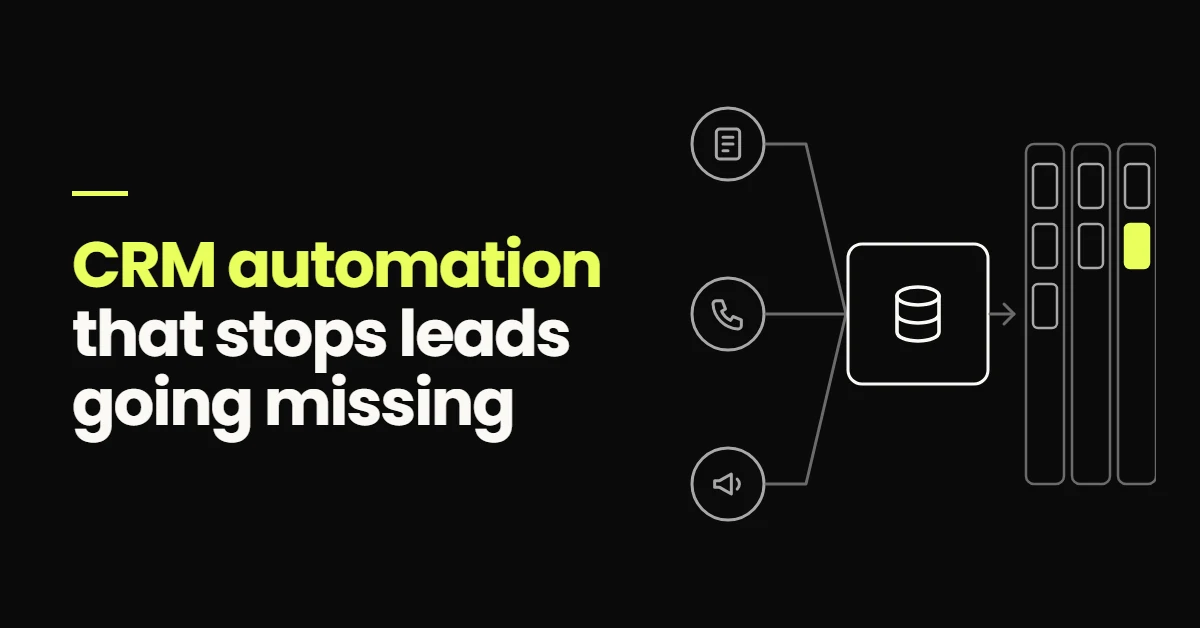
CRM automation follows one pattern: an event happens, a rule checks the conditions, and the CRM takes an action. The events are things the CRM can see: a form submission, an inbound call, a reply to a text, a booked appointment, a stage change, or a lead sitting untouched for a set number of days.
The actions are the admin your team does by hand today, or forgets to do: create or update the contact, record the source, open an opportunity in the right pipeline, assign an owner, notify them, send a first message, create a task, move the stage.
The scope is narrower than marketing automation as a whole. CRM automation is about the record and the pipeline, keeping every lead accounted for, owned and in the right place. If you want the broader picture first, start with what marketing automation means for a service business.
How an automated CRM handles a new lead
- Lead sourcesForms, calls, ads
- CRM recordSource, owner, stage
- Follow-upStarts on its own
- BookingStage moves when booked
What CRM automation fixes
Automatic lead intake from every source
Every lead source should write straight into the CRM: website forms, Facebook and Instagram lead forms, landing pages, chat widgets, tracked phone numbers and missed calls. Each submission creates a contact, or updates the existing one when the phone number or email already exists, and opens an opportunity at the first stage of the right pipeline. That matching rule matters: without it, a lead who fills in two forms becomes two contacts and gets two sets of messages.
Source tagging that survives to the end of the pipeline
The source has to be captured when the lead is created, because it cannot be rebuilt later. That means hidden form fields for UTM parameters, a separate form or tracking number per channel where practical, and a source field on the contact rather than a loose tag. Stored that way, a booked appointment or a won job can be traced back to the campaign that produced it.
Routing and ownership
Routing rules assign each new lead to a person based on conditions you define: the service requested, the location, the language, or a rotation across the team. The owner is notified with the lead's details, the assignment is recorded on the contact, and a task with a due time appears in their list.
A common failure point I see is routing that works until someone leaves, goes on holiday or changes role. Build a fallback: if a lead has no owner, or the owner has not acted within a set time, the rule reassigns it or alerts a manager.
Pipeline stages that move themselves
Stages should change because something happened, not because someone remembered. A reply moves the opportunity from New to Contacted. A booking moves it to Booked. An attended appointment moves it forward, and a no-show moves it into a recovery stage with its own workflow. Your team can still move cards by hand, but the default path runs on events.
Manual CRM vs automated CRM
Manual CRM
- Contact added when someone has time
- Source typed in, if at all
- Stage dragged after the fact
- Stalled leads found at month end
Automated CRM
- Contact created by the enquiry itself
- Source recorded from the form or number
- Stage moves on replies and bookings
- Stalled leads flagged after a set time
Follow-up that starts from the pipeline
Because the CRM knows each lead's stage, it can start the sequence that belongs to that stage and stop it when the lead replies. The CRM's job is making sure the right sequence starts for the right lead; message timing, channels and stop rules are covered in the guide to lead follow-up automation.
Stalled leads and re-engagement
A stalled lead is an open opportunity that has sat in one stage for too long. Time-in-stage rules catch them: after a week in Contacted with no reply, create a call task for the owner; after a month, move the lead to a Nurture stage with a slower sequence. The right numbers depend on your sales cycle. What matters is that the system notices, not someone scrolling the pipeline.
A dental enquiry should not depend on someone remembering to follow up.
An example of how an automated CRM handles a new patient enquiry at a dental practice, with stages for New enquiry, Contacted, Booked, Attended, Treatment plan sent, and Won or Lost.
-
Trigger
New patient enquiry A web form, Facebook lead form or missed call creates the contact, records the source and opens an opportunity at New enquiry.
-
Within a minute
Acknowledgement and owner An SMS from the practice number asks which treatment they are interested in. The treatment coordinator is assigned and notified.
-
On reply
Stage moves to Contacted The automated sequence stops. The coordinator picks up the conversation with the full history on the record.
-
If interested
Booking link The patient chooses a consultation slot. The opportunity moves to Booked and reminders start.
-
After the visit
Attended or no-show Attendance is marked on the appointment. Attended moves forward; a no-show starts a rescheduling message.
-
7 days no reply
Task, then nurture The coordinator gets a call task. After a longer silence the lead moves to a slower re-engagement sequence.
The front desk does not maintain the pipeline. They look after the patients in front of them, and the CRM keeps every other enquiry on track.
The booking half of that flow, including reminders and no-show recovery, has its own guide: appointment booking automation. If you build it in GoHighLevel, the pieces map onto pipelines, workflows and calendars, explained in GoHighLevel automation for service businesses.
How to design a pipeline automation can trust
Automation can only move stages reliably if each stage means something observable. "Hot" and "Warm" are opinions. "Replied", "Booked" and "Attended" are events. When stages are opinions, rules cannot move them, people move them inconsistently, and the reports stop meaning anything.
When I design a service-business pipeline, every stage has to answer four questions:
- 01What event puts a lead here? A form submission, a reply, a booking, a sent quote. If you cannot name one, the stage probably should not exist.
- 02What happens while it sits here? The workflow that runs, the task that gets created, and the person who owns it.
- 03What moves it out? The next event, or a time limit that sends it to a stalled or nurture stage.
- 04How long is too long? The time-in-stage threshold that puts the lead in front of a person.
Two more rules keep a pipeline clean. Use one pipeline per sales process, not one per lead source, because source belongs in a field. And when an opportunity is marked lost, pick the reason from a short list, so you can later see whether you lose on price, timing, fit or silence.
Reporting and attribution you can act on
A side effect of automated stages is that the data becomes trustworthy. When stages move on real events and every lead carries its source, the CRM can answer questions a manual pipeline never could:
- 01
Which lead source produces booked appointments, not just enquiries?
- 02
Where in the pipeline do most leads drop out?
- 03
How long does it take to get from first contact to a booked appointment?
Those answers change decisions. If a campaign produces plenty of form fills but few bookings, the problem is lead quality or follow-up, not volume. If most leads drop out between Contacted and Booked, the booking step needs work before you buy more traffic.
Attribution is only as good as what was captured at intake. If you run campaigns, tying booked and won outcomes back to the source is how you judge paid advertising on revenue instead of cost per lead.
Automation is not about replacing your team. It is about making sure the repetitive steps happen every time.
Capture Route Follow up Book Measure
Where CRM automation usually goes wrong
Most broken CRM automation was not built badly on day one. It drifted. These are the problems I find most often when I open an existing account:
- 01Duplicate contacts No matching rule on phone or email, so repeat enquiries create new records and receive follow-up twice.
- 02Two automations doing one job An old rule and a new one fire on the same trigger, and the lead gets two texts a minute apart.
- 03People and rules fighting over stages Staff drag cards while rules move them back. Decide which stages rules own and which people own.
- 04Routing to people who have moved on Assignments still point at someone who left or changed role, so new leads sit with nobody.
- 05Rules nobody reviews Automation built once and never checked. Trace a sample of recent leads each month and confirm each step happened.
When CRM automation makes sense, and where to start
CRM automation earns its setup time when leads come from more than one source, when more than one person handles them, or when you cannot say with confidence what happened to last month's enquiries. If you get two leads a week and answer each one yourself, a simple, well-kept CRM is enough for now.
Starting from a spreadsheet or a barely used CRM, build in this order:
- 01Connect every lead source One intake rule per source, with duplicate matching and a source field.
- 02Build the pipeline Stages defined by events, plus a short list of lost reasons.
- 03Add routing and notifications Owners, tasks with due times, and a fallback when nobody acts.
- 04Automate stage movement Replies, bookings and attendance move opportunities.
- 05Add stalled-lead rules Time-in-stage tasks and a nurture stage for leads that go quiet.
If you would rather have this built than build it in-house, it is the core of my marketing automation services. The Sixth Sense Martial Arts case study shows the same approach on a nine-stage GoHighLevel pipeline connected to Meta Ads, with trial booking and no-show recovery.
- A passive CRM stores what someone typed in. An automated CRM acts on events: new leads, replies, bookings and silence.
- Most lost leads fall through at intake, ownership or follow-up, and each of those can be handled by a rule.
- Define pipeline stages by observable events, so automation can move them and reports stay accurate.
- Record the source at intake. It cannot be rebuilt later, and it is what connects ad spend to revenue.
- Keep judgement with people: fit, pricing, call notes and lost reasons.
Frequently Asked Questions
CRM automation is the use of triggers and rules inside a customer relationship management system to handle lead management tasks without manual input. Typical examples are creating a contact when a form is submitted, recording the lead source, assigning an owner, moving a pipeline stage when a lead replies or books, and creating a task when a lead goes quiet. The aim is that every lead is recorded, owned and moving, even when nobody on the team has time to update the CRM.
It removes the manual steps where leads usually go missing. Every lead source writes straight into the CRM, so enquiries cannot sit unlogged in an inbox. Each lead gets an owner and a notification, so responsibility is clear. Follow-up starts automatically, and time-in-stage rules flag any lead that has not moved, so a forgotten enquiry becomes a task instead of a silent loss. Leads can still decide not to buy, but they stop disappearing because of admin.
Automate the tasks that should happen the same way every time: creating and deduplicating contacts, recording the lead source, assigning an owner, sending the first response, moving pipeline stages on replies, bookings and attendance, creating follow-up tasks, and flagging stalled leads. Keep the tasks that need judgement with people, such as qualifying fit on a call, writing call notes, agreeing prices, and recording why a deal was lost.
Yes, as long as follow-up is tied to the pipeline. The CRM starts the right sequence when a lead enters a stage, such as a first response for a new enquiry or a check-in after a quote is sent, and stops it when the lead replies, books or opts out. The conversation then passes to the lead's owner with the full history on the contact record, so nobody is chasing a lead who has already answered.
An automated pipeline moves opportunities between stages based on events rather than manual updates. A form submission opens an opportunity at the first stage, a reply moves it to Contacted, a booking moves it to Booked, and attendance or a no-show moves it again. Rules can also act on time, for example flagging an opportunity that has sat in one stage for too long. Staff can still move a card by hand when a conversation happens outside the system.