GoHighLevel 12 min read
What GoHighLevel Automation for Service Businesses Can Do
GoHighLevel can run most of a service business's lead handling in one account. What you can actually build with its CRM, workflows, calendars and AI tools, how the pieces connect, and where configuration matters more than the platform.
On this page
GoHighLevel, also called HighLevel or GHL, is bought by a lot of service businesses and fully used by far fewer. The account ends up holding a contact list and a calendar, while the parts that would change how leads are handled sit unconfigured.
GoHighLevel automation for service businesses means connecting the platform's CRM, pipelines, workflows, messaging, calendars and AI tools so that enquiries are captured, followed up, booked and tracked without manual steps. This guide covers what you can build, how the pieces fit together, and where the quality of the setup matters more than the software.
In GoHighLevel you can automate lead capture from forms, ads and calls; pipeline stages and opportunities; SMS and email follow-up; missed-call text-back; lead routing; booking, confirmations and reminders; no-show recovery; reactivation campaigns; attribution reporting; and AI chat and voice agents. All of it runs through workflows built from triggers and actions that share one contact record. The platform covers most service-business needs natively. Results depend on how carefully those workflows, pipelines and calendars are designed and tested.
Is GoHighLevel a CRM or an automation platform?
Both. GoHighLevel combines a CRM with the tools that act on it. Inside one sub-account, which is the workspace for a single business, you get:
- 01Contacts and custom fields One record per person, holding details, source, tags, notes and conversation history.
- 02Opportunities and pipelines Deals moving through stages you define, each with a value, an owner and a status.
- 03Conversations Two-way SMS, email and social messages in one inbox, attached to the contact.
- 04Workflows The automation builder: triggers, conditions, waits and actions.
- 05Calendars Booking pages and appointment types that feed workflows when someone books, cancels or misses an appointment.
- 06Forms, surveys and funnels Lead capture pages that write straight into contacts.
- 07Phone system Numbers, call tracking and missed-call handling.
- 08AI tools Conversation AI for chat and messaging, and Voice AI agents for calls.
That combination is the main reason it suits service businesses. Every text, call, booking and stage change lands on the same contact record, so automations can react to any of them without integrations between separate tools. The trade-off is reliance on one platform for a lot, with each tool broad rather than the deepest in its category.
HighLevel is sold heavily to marketing agencies, which often resell it under their own brand. That is why many service businesses first meet it as their agency's CRM. The platform works the same either way.
How a GoHighLevel build fits together
A working build follows the lead. Each layer hands something to the next, and most broken accounts have a gap between two of them.
A GoHighLevel build, in the order a lead moves through it
- Lead sourceForm, ad, call, chat
- GHL contactSource and fields
- PipelineOpportunity and stage
- WorkflowMessages and tasks
- CalendarBooking and reminders
Entry points are the forms, surveys, ad integrations, phone numbers and chat widgets that create contacts. Each should record its source in a field, not only a tag.
The contact holds everything later automation needs in order to decide: service interest, location, consent, owner.
The pipeline shows commercial progress. Opportunities move stage by stage and are closed as won, lost or abandoned.
Workflows do the work in between: responses, follow-up, routing, notifications and stage changes.
Calendars close the loop, and their appointment statuses drive the reminder and no-show workflows.
How GoHighLevel workflows work
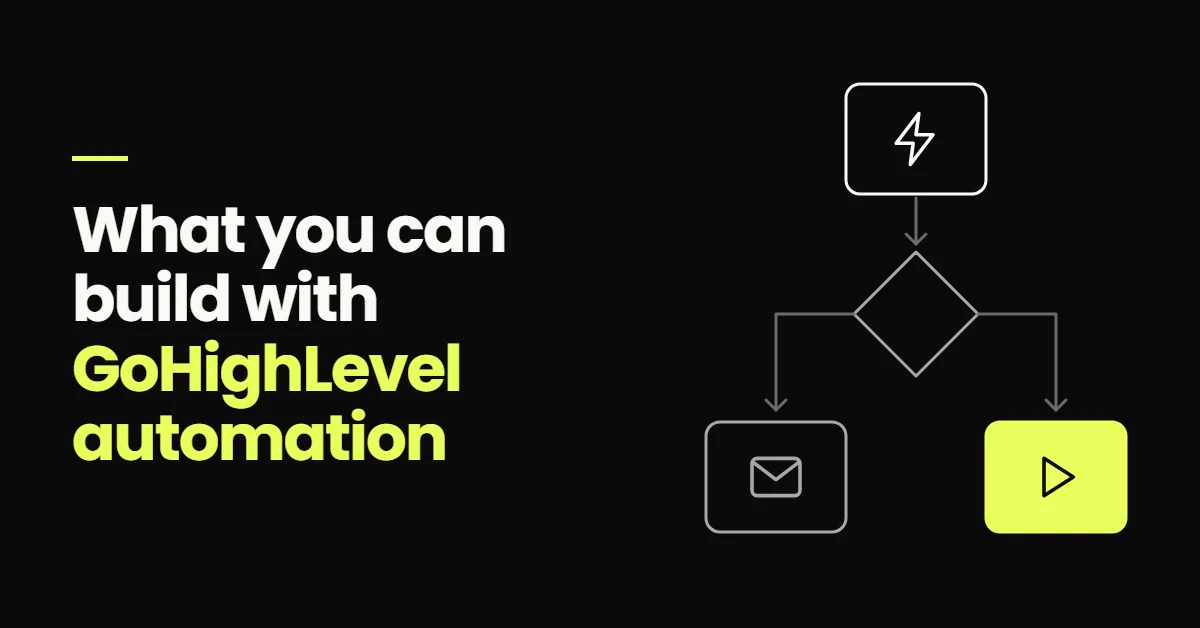
Every workflow starts with at least one trigger, the event that enrols a contact. Filters on the trigger, and if/else branches inside the workflow, act as conditions. The steps after that are actions, usually with wait steps in between.
Anatomy of a GoHighLevel workflow
- TriggerForm submittedA new enquiry arrives from the quote form
- ConditionService is repairsA filter or if/else branch picks the path
- ActionText, opportunity, ownerSend an SMS, open an opportunity, assign and notify
HighLevel's help centre keeps a full list of workflow triggers, and names change from time to time as the builder is updated. The ones most service-business builds rely on are:
| Trigger | Typical use |
|---|---|
| Form Submitted | Start the new-lead workflow for a specific form |
| Customer Replied | Stop follow-up and alert the owner when a lead responds |
| Call Status | Act on missed, busy or voicemail calls |
| Appointment Status | Send confirmations, reminders and no-show follow-up |
| Pipeline Stage Changed | Start the workflow that belongs to a stage, such as quote follow-up |
| Opportunity Status Changed | Start post-sale or lost-lead workflows |
On the action side, most builds lean on sending SMS and email, creating or updating opportunities, assigning a user, internal notifications and tasks, updating fields and tags, wait steps and if/else branches. A webhook action can pass data to a system outside HighLevel when a step needs it.
What you can build with GoHighLevel automation
Lead capture from forms, ads and calls
Native forms and surveys write straight into contacts. Facebook and Instagram lead forms can sync into the account, and tracked phone numbers log calls against the right contact. Hidden fields can carry UTM parameters, so the campaign behind each lead is stored on the record.
Pipelines and opportunities
Build one pipeline per sales process, with stages defined by events: New lead, Contacted, Booked, Showed, Quote sent, Won. Workflows open the opportunity when a lead arrives and move it when something happens. The principles behind stage design are in the guide to CRM automation.
SMS and email follow-up
A new-lead workflow sends an acknowledgement, waits, checks whether the lead has replied, and carries on with a spaced sequence if not. A separate workflow on the Customer Replied trigger removes the contact from follow-up and notifies the owner. The cadence itself is platform-independent and explained in lead follow-up automation. In the US, texting from a local number requires A2P 10DLC registration, which HighLevel handles inside the account.
Missed-call text-back
HighLevel includes a missed-call text-back setting in the phone system that texts callers whose calls go unanswered. You can also build the same thing as a workflow on the Call Status trigger, which gives more control over wording, business hours and repeat callers. Use one approach, not both, or callers get two texts.
Lead routing
Workflows can assign an owner based on the service requested, the location, or a rotation between team members, then notify that person and create a task. Add a fallback branch so a lead is never left without an owner when someone is away.
Calendars, confirmations and reminders
Calendars handle availability, appointment types and booking pages. The Appointment Status trigger starts confirmation and reminder workflows when a booking is made, and can update the opportunity stage at the same time. How to design the reminder schedule is covered in the guide to appointment booking automation.
No-show recovery
When an appointment is marked as a no-show, a workflow sends a friendly rescheduling message with a booking link, moves the opportunity to a recovery stage, and creates a task if the lead does not rebook. It depends on someone, or an integration, marking attendance accurately.
Reactivation campaigns
Smart lists filter contacts by tag, stage or last activity, such as leads that went cold more than 90 days ago. Enrol them in a reactivation workflow with a relevant message, in small batches, and route replies to a person so the team is not flooded.
Attribution and reporting
HighLevel stores both a first and a latest attribution source on each contact, so you can see where a lead originally came from and what brought them back. With pipeline stages and opportunity values alongside, you can report on which sources produce booked and won work, not only form fills.
AI chat
Conversation AI can answer questions on your website chat and messaging channels, collect details and book appointments into a calendar. Booking settings can pause the bot after a successful booking or hand the conversation on. Designing the qualification questions and guardrails is covered in how AI chat can qualify leads.
Voice AI
Voice AI agents can answer inbound calls, collect caller details, book appointments and transfer calls to a person. They suit after-hours and overflow calls far better than complex conversations. Where they fit, and where they should not be used, is in voice AI for service businesses.
What a GoHighLevel build looks like in practice
For Sixth Sense Martial Arts, I connected Meta Ads to a GoHighLevel system built around a nine-stage pipeline and six workflows. Each enquiry follows the same path:
- 01Meta ad to lead form or landing page The enquiry arrives through a defined entry point rather than a direct message.
- 02Contact with source recorded The campaign that produced the enquiry stays attached to the record.
- 03Pipeline entry The opportunity opens at New Lead, so its position is visible immediately.
- 04SMS and email follow-up Starts without anyone remembering to start it.
- 05Trial booking and appointment tracking The prospect books a trial class from the follow-up, and the booking is reflected against the opportunity.
- 06No-show recovery A missed trial triggers a defined next step instead of ending the thread.
Nothing in that list is unusual for GoHighLevel. What made it work was deciding the stages, triggers and handoffs before building, then testing each workflow against real enquiries.
Where configuration matters more than the platform
Two businesses on the same GoHighLevel plan can get opposite results, and the difference is almost always the setup. The problems that come up again and again when I audit an account:
- 01Snapshots installed and never adapted A template account with generic messages and stages that do not match how the business sells.
- 02Duplicate or conflicting workflows Old and new versions both published, so leads get two messages or stages jump back and forth.
- 03Missing stop conditions Follow-up keeps running after a lead replies or books because nothing removes them from the workflow.
- 04Unregistered messaging Texts sent before A2P registration is complete are filtered or blocked by carriers.
- 05Calendars out of step with reality Availability that ignores staff schedules, travel time or buffers, so bookings have to be moved by hand.
- 06Nobody watching the inbox Automations prompt replies that land in a Conversations tab nobody checks.
None of those are platform limitations. They are design and testing problems, and they would happen on any system.
When GoHighLevel is not the right fit
GoHighLevel suits service businesses with a clear path from enquiry to appointment. It is a weaker fit when:
- 01Your team already runs well on another CRM Migrating a working sales team is disruptive. Connecting the existing CRM to the tools you need may be the better project.
- 02Sales cycles are long and complex Deals with several decision-makers, custom quoting and forecasting may need a dedicated sales CRM.
- 03Ecommerce is the core business A dedicated ecommerce platform handles catalogues, stock and checkout better.
- 04Reporting needs go beyond the dashboards Multi-touch attribution or deeper analysis usually means exporting data to another tool.
- 05Strict data requirements apply Regulated businesses should confirm the platform's position for their use case before storing sensitive data.
When a workflow cannot express the logic you need, webhooks and the HighLevel API let custom code handle that step. That is the kind of work covered by my AI development with Claude Code service, but it should be the exception, not the starting point.
A sensible build order in GoHighLevel
-
01
Foundations Phone numbers, A2P registration, an email sending domain, business hours and users.
-
02
Capture Forms, ad integrations and tracked numbers, each recording its source.
-
03
Pipeline Event-based stages, opportunity values and lost reasons.
-
04
New-lead workflow Acknowledgement, follow-up sequence, reply handling, routing and owner alerts.
-
05
Booking Calendars, confirmations, reminders and no-show recovery.
-
06
Reactivation and AI Reactivation campaigns, then AI chat or Voice AI once the basics are proven.
-
07
Reporting Dashboards for source, stage conversion and booked appointments, reviewed monthly.
Designing, building and testing accounts in this order is most of the work in my marketing automation services.
- GoHighLevel is both a CRM and an automation platform: contacts, pipelines, conversations, workflows, calendars, phone and AI tools share one record.
- Every workflow follows trigger, condition, action. Form Submitted, Customer Replied, Call Status, Appointment Status and Pipeline Stage Changed do most of the work in service-business builds.
- You can automate capture, follow-up, missed calls, routing, booking, reminders, no-shows, reactivation, attribution, AI chat and voice.
- Most disappointing accounts fail on configuration: generic snapshots, conflicting workflows, missing stop rules and unregistered messaging.
- Build foundations, capture, pipeline and follow-up first. Add AI once the basics work.
Sources
- A List of Workflow Triggers, HighLevel Support Portal
- Where and how to configure the missed call text back feature, HighLevel Support Portal
- Understanding attribution source, HighLevel Support Portal
- Appointment booking in Conversation AI, HighLevel Support Portal
- Create, test and deploy a Voice AI agent, HighLevel Support Portal
Frequently Asked Questions
You can automate most of the lead handling in a service business. That includes capturing leads from forms, ads and calls, creating contacts and opportunities, sending SMS and email follow-up, texting back missed calls, assigning owners, booking appointments, sending confirmations and reminders, following up no-shows, running reactivation campaigns and reporting on lead sources. Conversation AI and Voice AI agents can also answer chats and calls, collect details and book appointments within limits you set.
It is both. GoHighLevel includes a CRM with contacts, custom fields, pipelines and opportunities, and it includes the tools that act on that data: a workflow builder, two-way messaging, calendars, forms, a phone system and AI agents. Because they share one contact record, a workflow can react to a reply, a booking or a missed call without connecting separate software. The trade-off is that each tool is broad rather than the most advanced in its category.
Yes. GoHighLevel calendars provide booking pages with availability, appointment types and buffers, and bookings can also be made through Conversation AI or Voice AI agents. The Appointment Status workflow trigger then runs confirmations, reminders, rescheduling messages and no-show follow-up, and can move the related opportunity through the pipeline. The booking flow only works well if calendar availability reflects real staff schedules.
Yes, in two ways. The phone system has a built-in missed-call text-back setting that sends an SMS to callers whose calls go unanswered. Alternatively, a workflow using the Call Status trigger can send a text, create a task and notify a team member, with more control over wording and business hours. Use one method rather than both, otherwise callers receive duplicate messages. Voice AI agents can also answer calls that would otherwise be missed.
It works well for service businesses where the sale runs through an enquiry, a conversation and an appointment, such as clinics, trades, consultants, fitness studios and agencies. Its strength is keeping capture, follow-up, booking and reporting in one system. It is a weaker fit when a team already relies on a different CRM, when sales cycles are long and complex, or when ecommerce is the core of the business.