Service / Marketing Automation Services

Marketing automation services built around the customer journey.

My marketing automation services cover CRM pipelines, lead-routing systems, follow-up workflows, missed-call recovery, SMS and email automation, appointment booking, no-show recovery, and reporting, built around the way your business actually handles enquiries.

The goal is not to automate everything. The goal is to make sure repeatable steps happen consistently and every lead has a clear next action.

  • 24+ workflows live in production
  • GoHighLevel and custom integrations
  • Website, ads and CRM experience
  • US, UK and international projects
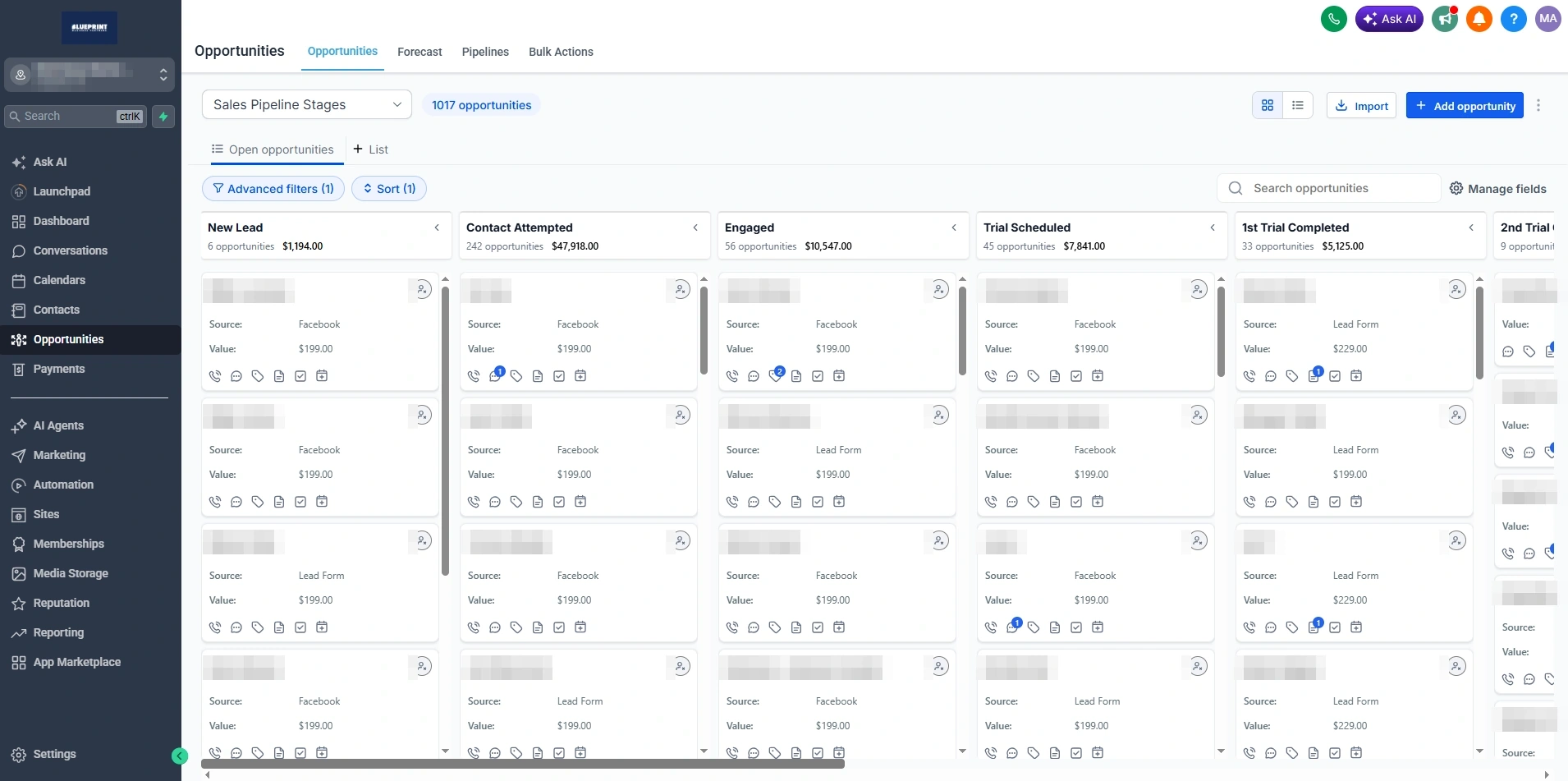
GoHighLevel opportunities board showing sales pipeline stages with opportunity counts and stage values, contact names blurred
Pipeline Live account, names and account blurred
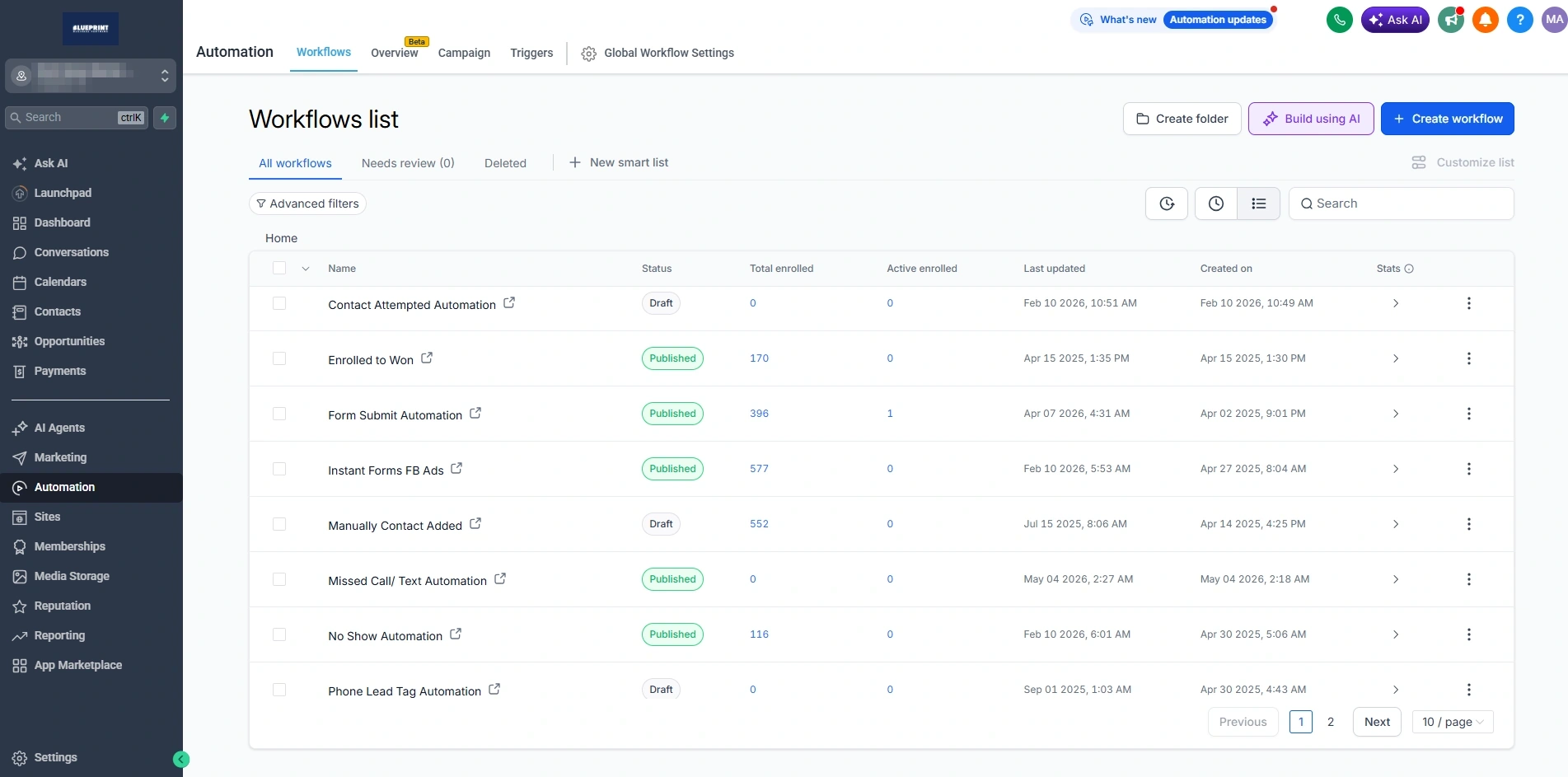
GoHighLevel workflows list showing published automations for contact follow-up, form submissions, missed call text back and no-show recovery
Workflows Published and draft automations
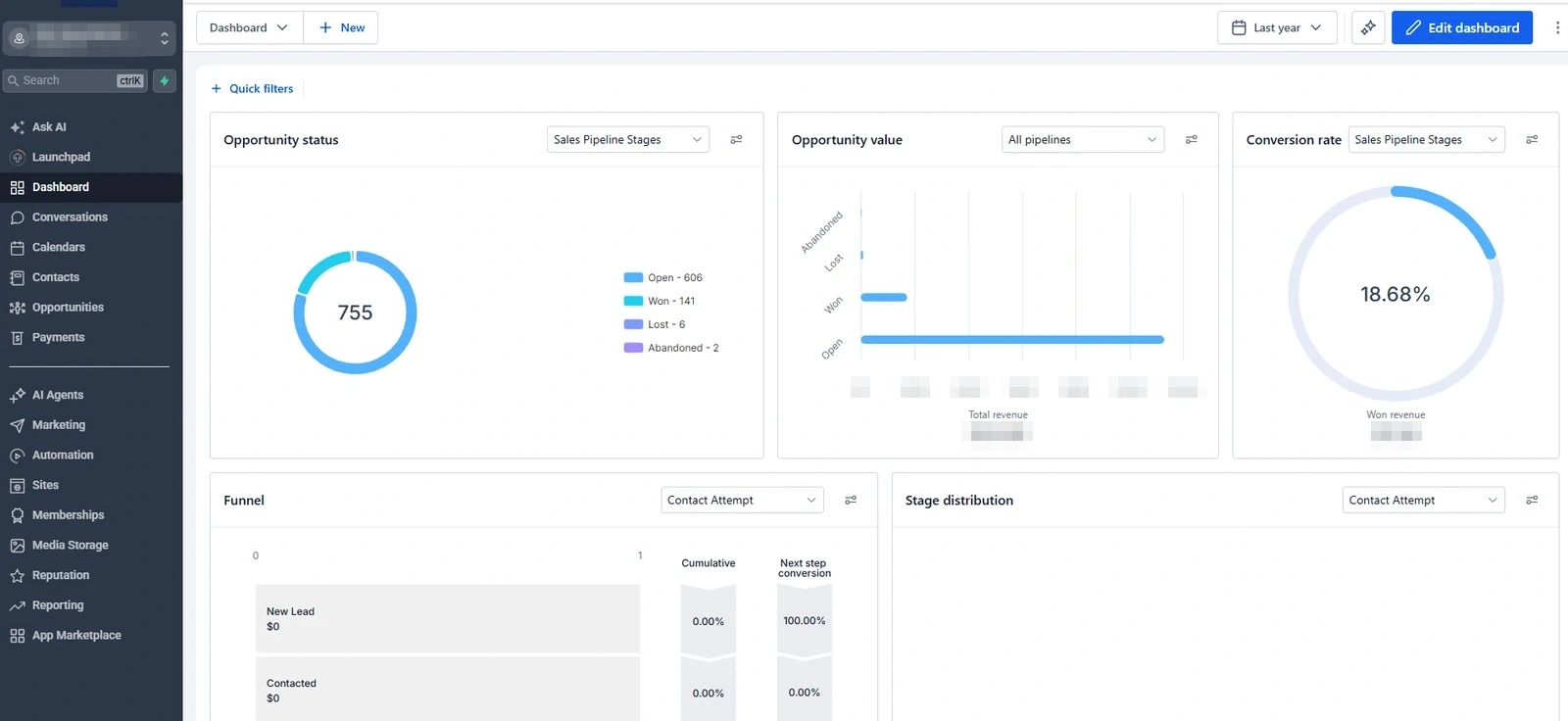
GoHighLevel dashboard showing opportunity status counts, opportunity value and conversion rate, revenue figures redacted
Reporting Opportunity status, revenue redacted
01 01 / The problem

Generating the lead is only the first step.

Most service businesses do not have a lead generation problem. They have a lead handling problem. A business may be paying for calls, forms and enquiries while leads still sit unassigned, receive inconsistent follow-up, or disappear between the website, inbox, CRM and sales team.

What usually happens

  1. 01Ad or search
  2. 02Form or call
  3. 03Inbox
  4. 04Delay
  5. 05No owner
  6. 06No follow-up
  7. 07Lost opportunity

What it should look like

  1. 01Lead source
  2. 02CRM
  3. 03Owner
  4. 04Response
  5. 05Follow-up
  6. 06Booking
  7. 07Outcome

Automation creates structure between these steps. It handles repeatable work so the team can focus on conversations and decisions that need a person

02 02 / Services

What I build and connect.

Ten areas of CRM automation services. Few businesses need all of them at once. The audit decides which two or three change the outcome fastest.

CRM and pipeline setup

I structure pipelines around real stages in the customer journey so each enquiry has a status, owner, source, next action, and outcome.

PipelinesStagesOwnershipSource tracking

Typical deliverables

  • Pipeline design
  • Stage definitions
  • Lead statuses
  • Custom fields
  • Tags
  • Lead ownership
  • Source tracking
  • Opportunity structure
  • Won and lost outcomes
  • Reporting foundation

Lead routing and assignment

I route enquiries to the correct person, location, pipeline, or team based on source, service, location, availability, and business rules. Routing only works when the underlying business data is accurate, so that gets checked first.

RoutingAssignmentEscalationNotifications

Typical deliverables

  • Lead source capture
  • Round-robin where appropriate
  • Location routing
  • Service-based routing
  • Owner assignment
  • Task creation
  • Notifications
  • Escalation rules

Lead follow-up automation

I build structured follow-up sequences using SMS, email, tasks, calls, booking links, and status changes.

SMSEmailTasksStop conditions
Connects to paid advertising services

Typical deliverables

  • Immediate acknowledgement
  • Multi-step follow-up
  • SMS sequences
  • Email sequences
  • Call tasks
  • Booking links
  • Stop conditions
  • Reply detection
  • Stage changes
  • Lead status updates

Missed-call recovery

I build missed-call text-back and follow-up systems that respond when the team cannot answer immediately. Recovery rates depend on the market and the offer, so I do not quote one.

Missed call text backBusiness hoursDuplicate protection

Typical deliverables

  • Missed-call detection
  • Immediate SMS
  • Follow-up task
  • Reply handling
  • Duplicate protection
  • Business-hours rules
  • Pipeline entry
  • Owner notification
  • Reporting

Appointment booking automation

I connect calendars, forms, reminders, confirmations, rescheduling, appointment stages, and follow-up around the booking process.

CalendarsRemindersReschedulingNotifications

Typical deliverables

  • Calendar setup
  • Booking forms
  • Confirmation messages
  • Reminder sequences
  • Rescheduling
  • Cancellation handling
  • Appointment stages
  • Team notifications
  • Source tracking
  • Calendar integration

No-show recovery

I build workflows that identify missed appointments and begin an appropriate rebooking or follow-up sequence. Some people rebook and some do not, so the workflow is judged on whether the attempt happens, not on a promised return rate.

No-show statusRebookingStop conditions

Typical deliverables

  • No-show status
  • Follow-up SMS
  • Follow-up email
  • Rebooking link
  • Task creation
  • Pipeline update
  • Stop conditions
  • Reporting

Lead nurturing

I create longer follow-up paths for prospects who are interested but not ready to book or buy immediately.

NurtureStage-based messagingExit conditions

Typical deliverables

  • Educational SMS
  • Email nurture
  • Offer reminders
  • Content links
  • Stage-based messaging
  • Long-term follow-up
  • Reply detection
  • Exit conditions

Customer reactivation

I help organize and contact older leads, inactive customers, missed opportunities, and dormant contacts using defined segments and compliant communication. Consent and opt-out status are confirmed before any list is contacted.

SegmentationReactivationSuppression rules

Typical deliverables

  • Database review
  • Segmentation
  • Tag cleanup
  • Reactivation lists
  • SMS and email campaigns
  • Reply routing
  • Booking links
  • Outcome tracking
  • Suppression rules

Review and reputation workflows

I build post-service review requests and follow-up processes that make it easier for satisfied customers to share feedback. The workflow asks, it does not decide what people write.

Review requestsFeedback routingReminders

Typical deliverables

  • Completion trigger
  • Review request
  • Reminder
  • Feedback routing
  • Stop conditions
  • Team notification
  • Reporting

Reporting and workflow monitoring

I monitor workflow entry, delivery, replies, bookings, stage movement, failures, and operational gaps.

DeliveryFailuresPipeline movementOutcomes

Typical deliverables

  • Workflow status
  • Delivery review
  • Error review
  • Pipeline reporting
  • Lead-source reporting
  • Appointment reporting
  • Owner reporting
  • Conversion-stage review
  • Improvement recommendations
03 03 / The system

Every automation should connect to a real operational step.

Eleven steps between a click and a recorded outcome. A workflow without clear ownership, exit rules and reporting usually creates more confusion than it removes.

01Traffic source

The system records where the enquiry originated.

02Form or call

The contact enters through a defined entry point.

03Contact created

The person is stored once with the required information.

04Source captured

Campaign, form, referral, website or call information is retained.

05Owner assigned

Responsibility is clear.

06Pipeline stage

The enquiry has a visible status.

07First response

The customer receives an appropriate acknowledgement.

08Follow-up

Messages and tasks continue according to the workflow.

09Booking

The prospect can move to the next step.

10Outcome

The opportunity is marked correctly.

11Reporting

The business can see where leads move or stop.

04 04 / Verified work

Automation built around real businesses.

More than two years focused on CRM and marketing automation, inside a broader eight years across web development, SEO, and paid acquisition. More than 24 workflows are live in production right now.

Appointment-driven / GoHighLevel

Sixth Sense Martial Arts

The system connects lead generation with the process that contacts, tracks, books and follows up with each trial enquiry. Meta leads arrive in the CRM with their source attached rather than landing in an inbox.

What is running

  • Nine-stage pipeline
  • Six active workflows
  • Meta Ads lead connection
  • Trial booking
  • SMS follow-up
  • Email follow-up
  • Appointment tracking
  • No-show recovery

Direct client engagement. Read the Sixth Sense case study

GoHighLevel opportunities board for Sixth Sense Martial Arts showing pipeline stages with opportunity counts and stage values, contact names blurred
The live pipeline. Contact names blurred, stage structure left readable
Ecommerce and enquiries / customer follow-up

Dallas Parrots

$40K → $126KApproximate monthly revenue, within one year

This was a multi-channel growth outcome supported by website improvements, SEO, paid advertising, ecommerce management, phone bookings, customer follow-up, CRM improvements, and sales process changes. Automation was one contributor and did not produce the result on its own.

My work

  • Website and ecommerce support
  • Product enquiries
  • Phone booking flow
  • Customer follow-up
  • CRM improvements
  • Sales process support
  • Google Ads connection
  • Meta Ads connection

Direct client engagement. Read the Dallas Parrots case study

GoHighLevel workflows list from a live client account showing published and draft automations for contact follow-up, form submissions, missed call text back and no-show recovery, account name blurred
The workflow layer, shown from a de-identified client account rather than this one
Call and booking-driven / repeatable system

Executive transport

Two UK executive transport operators use the same repeatable booking system. The system supports consistent booking and customer-handling steps while each business keeps its own account, data, and operations.

What the system covers

  • Booking process
  • Customer handling steps
  • Separate accounts
  • Separate data
  • Shared structure
  • Repeatable setup

No booking volumes published. The verified detail is that both operators run the same system

GoHighLevel dashboard from a live client account showing opportunity status counts, opportunity value and conversion rate, account name and revenue figures blurred
The reporting layer, shown from a de-identified client account rather than this one
05 05 / CRM diagnosis

2,475 contacts. None tagged. None assigned.

A CRM I inherited on one engagement. The contacts were all there. Nothing was running on any of them. This is a common state rather than an unusual one, and it is not a criticism of the business that handed it over.

2,475Contacts in the account, with no follow-up running on any of them
  • No segmentation, so no list could be contacted safely
  • No ownership, so no person was responsible for any enquiry
  • No visible next action on any record
  • No consistent lead status across the database
  • No follow-up history, so past contact could not be checked
  • No clear source, so nobody knew which marketing produced what
  • No reactivation process for older contacts
  • No useful reporting, because there was no structure to report on

The cleanup order

  1. 01Audit
  2. 02Clean
  3. 03Segment
  4. 04Assign
  5. 05Stage
  6. 06Follow up
  7. 07Report

A CRM full of contacts is not the same as a working pipeline

06 06 / GoHighLevel

GoHighLevel is useful when the system is designed properly.

I use GoHighLevel as part of the operational system. The account structure, pipeline, workflow logic, stop conditions, ownership, naming, and reporting still need to match the business.

01 Records and structure

  • CRM pipelines
  • Opportunities
  • Tags
  • Custom fields
  • Lead routing

02 Capture

  • Forms
  • Surveys
  • Calendars
  • Booking pages

03 Communication

  • Workflows
  • SMS
  • Email
  • Notifications
  • Tasks

04 Handover

  • Reporting
  • Snapshots
  • Documentation
  • Client onboarding
  • Support

Installing a snapshot does not replace understanding the customer journey. A snapshot copies structure, not the reasons behind it, and a workflow built for one business often carries assumptions that do not hold for the next one.

07 07 / Custom systems

When the platform cannot do it natively.

I built a custom Node.js integration server connecting the GoHighLevel API directly with an AI model. Contacts, pipelines and workflows can be managed programmatically inside a live client account.

01GoHighLevelThe live client account, with its own pipelines, contacts and workflows.
02APIThe documented interface, used for both reading and writing.
03Node.js serverThe layer I control. Validation, logging and access rules live here.
04AI modelProposes an action. It does not hold account credentials.
05Approved actionOnly actions that pass validation reach the account.
Access control

The model works through the server, never directly against the account.

Validation

Every proposed action is checked against rules before it runs.

Logging

Actions are recorded so a change can be traced back.

Error handling

Failures stop rather than partially apply.

Human review

Sensitive actions wait for a person.

Custom tooling is useful when a requirement cannot be handled reliably through native workflows alone. It is not a reason to give an AI model unrestricted access to a client account.

08 08 / Communication

Use the right message at the right stage.

SMS and email should support each other rather than send the same message twice. The channel is chosen by how urgent the step is and how much the reader needs to take in.

SMS

Short, immediate, time-sensitive

Read within minutes, so it suits the steps where speed changes the outcome and the message fits in a sentence.

Useful for

  • Immediate acknowledgement
  • Missed-call text back
  • Appointment confirmation
  • Reminders
  • Short follow-up
  • Rebooking
  • Time-sensitive communication
Email

Longer, referenceable, ongoing

Suits anything the reader may want to come back to, and anything that needs more than a couple of lines to explain.

Useful for

  • Longer explanations
  • Educational nurture
  • Service information
  • Appointment details
  • Documents
  • Long-term follow-up
  • Reactivation
  • Ongoing communication

01 Consent and opt-out

  • Consent recorded at capture
  • Opt-out honoured across channels
  • Suppression lists respected

02 Timing

  • Sending windows
  • Business hours rules
  • Frequency limits

03 Safeguards

  • Duplicate protection
  • Stop on reply
  • Exit conditions on every sequence

04 Identity

  • Correct sender identity
  • Business-specific language
  • Recognisable to the recipient

I build opt-out handling, sending rules, and workflow safeguards. I do not give legal advice. Compliance requirements vary by jurisdiction, platform, and message type, and the business is responsible for confirming its own obligations.

09 09 / Booking

The booking workflow should continue after the calendar confirmation.

Most booking setups stop at the confirmation email. The steps that decide whether someone actually turns up, and what happens if they do not, sit after that point. Sixth Sense Martial Arts runs this pattern for trial bookings.

BeforeEnquiry

Qualification, service type, and lead source captured at the point of contact.

BeforeBooking link

Calendar selection and availability, sent at the moment the prospect is ready.

At bookingAppointment confirmed

Confirmation message, preparation details, team notification, pipeline stage moved.

BeforeReminder

Reminder sequence sized to the gap between booking and appointment.

Path A Attended
  • Attended status set
  • Next service or follow-up
  • Review request
  • Pipeline moves forward
Path B No-show
  • No-show status set
  • Follow-up SMS and email
  • Rebooking link
  • Task for the owner
  • Stop conditions once rebooked

Whether someone rebooks is not something a workflow controls. Whether they are contacted is

10 10 / Audit

What I review before building another workflow.

Seven areas. More workflows do not automatically create a better system, and most accounts I inherit need fewer workflows arranged more carefully rather than more of them.

01 Lead sources

  • Website forms
  • Phone calls
  • Meta Ads
  • Google Ads
  • Chat
  • Manual entry
  • Referrals
  • Imports

02 CRM structure

  • Pipelines
  • Stages
  • Tags
  • Custom fields
  • Duplicates
  • Lead source
  • Opportunity status
  • Data quality

03 Ownership

  • Assigned user
  • Team routing
  • Location routing
  • Responsibilities
  • Escalation
  • Unassigned leads

04 Workflow logic

  • Entry triggers
  • Filters
  • Wait steps
  • Branches
  • Stop conditions
  • Reply handling
  • Duplicate prevention
  • Error paths

05 Communication

  • SMS content
  • Email content
  • Sending windows
  • Frequency
  • Personalization
  • Opt-out handling
  • Sender identity

06 Booking

  • Calendars
  • Availability
  • Confirmation
  • Reminders
  • Rescheduling
  • Cancellation
  • No-show handling

07 Reporting

  • Source tracking
  • Pipeline movement
  • Owner activity
  • Appointment status
  • Workflow delivery
  • Replies
  • Outcomes
  • Failures

More workflows do not automatically create a better system

11 11 / Process

How automation moves from audit to a working system.

Testing matters because a workflow can look correct in the builder and still fail in real use.

01

Business review

I review how enquiries arrive, who handles them, what information is required, what the next step is, and where leads currently get lost.

02

System mapping

I map sources, forms, calls, pipelines, owners, stages, communication, calendars, outcomes, and reporting.

03

CRM structure

I create or improve the pipelines, stages, fields, tags, ownership rules, and source tracking.

04

Workflow build

I build the triggers, filters, branches, messages, tasks, booking actions, stop conditions, and error paths.

05

Testing

I test entry conditions, duplicate handling, replies, timing, assignment, booking, notifications, stage movement, and exit rules.

06

Launch and monitoring

I activate the system, review live behavior, fix gaps, document the build, and improve workflows using real operational feedback.
12 12 / Fit

Automation for businesses with repeatable lead and customer processes.

Automation works best when the business has a clear process, responsible team members, and defined outcomes. Without those, a workflow only moves the confusion somewhere else.

Model 01

Appointment-driven

Examples

  • Academies
  • Clinics
  • Studios
  • Practices
  • Consultation businesses

Useful automations

  • Lead acknowledgement
  • Appointment booking
  • Reminders
  • No-show recovery
  • Nurture
  • Reactivation
  • Reviews
Model 02

Call-driven

Examples

  • Transport
  • Real estate
  • Local services
  • Repair
  • Professional services

Useful automations

  • Missed-call text back
  • Call follow-up
  • Quote requests
  • Lead assignment
  • Booking
  • Status updates
  • Task creation
Model 03

Enquiry and ecommerce-driven

Examples

  • Ecommerce
  • Retail
  • Product businesses
  • Property projects
  • Nonprofit campaigns

Useful automations

  • Product enquiries
  • Customer follow-up
  • Lead nurture
  • Abandoned enquiry follow-up
  • Phone booking
  • Reactivation
  • Repeat customer communication
13 13 / Difference

I understand what happens before and after the workflow.

More than two years focused on CRM and marketing automation, inside more than eight years across web development, SEO, and paid acquisition, with more than 20 clients and businesses supported.

Development

I can look at the technical layer

I can review the website, forms, landing pages, tracking, APIs, webhooks, and technical integration points.

SEO

I know how the visitor arrived

I understand how organic visitors arrive, what information they expect, and how search intent affects the enquiry.

Paid advertising

Lead quality feeds back into the campaign

I understand how Meta and Google leads enter the system and why campaign optimization depends on lead quality and sales feedback.

CRM and automation

Built around outcomes, not messages

I build around ownership, stages, stop conditions, booking, outcomes, and reporting rather than isolated messages.

Operations

The system has to fit how the team works

I review how the team actually works so the system supports the business instead of creating extra administrative work.

Automation is useful when it improves the handoff between people, tools, and next actions

14 14 / Questions

Questions about marketing automation services.

Short answers. Anything specific to your CRM is worth a call, where I can look at the actual pipelines and workflows.

Marketing automation services involve connecting lead sources, CRM records, pipelines, ownership, SMS, email, booking, tasks, follow-up, reporting, and other repeatable processes so they happen consistently.

I work primarily with GoHighLevel for CRM and marketing automation. I also build custom integrations and tools when a requirement cannot be handled reliably through native platform features.

Yes. Follow-up can include SMS, email, tasks, booking links, stage changes, notifications, reply handling, and stop conditions based on the business process.

Yes. A missed-call workflow can send an acknowledgement, notify the team, create or update the contact, and begin follow-up according to defined rules.

Yes. Leads can be routed by source, service, location, team, calendar, availability, or other verified business rules.

Yes. Lead-source information can be captured and routed into the correct pipeline, owner, workflow, calendar, and reporting process where the platform setup supports it.

Yes. Booking systems can include confirmation, reminders, rescheduling, cancellation handling, team notifications, and no-show recovery.

Yes. Existing contacts can be audited, cleaned, segmented, and placed into appropriate reactivation campaigns. Consent, opt-out status, data quality, and communication rules must be reviewed first.

No. Automation handles repeatable administrative steps. People are still needed for conversations, judgement, service delivery, sales decisions, and exceptions.

Yes. I can review pipelines, stages, contacts, tags, fields, workflows, calendars, forms, lead ownership, communication, reporting, naming, errors, and duplicate logic.

Yes. Custom integrations may use APIs, webhooks, Node.js, internal tools, and validation layers where the project requires functionality beyond native workflows.

The timeline depends on the number of lead sources, pipelines, workflows, calendars, integrations, messages, team members, testing requirements, and the condition of the existing CRM. I confirm the timeline after the audit.

Yes. Important workflow logic, triggers, stages, fields, routing rules, and operating steps can be documented as part of the agreed scope.

Yes. I can work directly with a business or support an agency with account setup, workflow builds, onboarding, documentation, testing, troubleshooting, and ongoing support.

I review workflow delivery, replies, lead ownership, pipeline movement, bookings, appointment status, outcome tracking, failures, and business feedback where the data is available.

I build opt-out handling, sending rules, and workflow safeguards where required, but legal and regulatory requirements vary by jurisdiction and message type. Businesses should confirm their compliance obligations.

15 / Start with an audit

Find where leads are getting lost between enquiry and outcome.

I can review your lead sources, CRM, pipelines, ownership, workflows, SMS, email, booking process, no-show handling, reporting, and integrations before defining the highest-priority improvements.

AvailabilityRemote, working with clients worldwide