Lead Follow-Up 11 min read
Lead Follow-Up Automation That Catches Leads Before They Go
Most lost leads are not rejected. They are not followed up in time. How to automate the first response and every follow-up after it, and when to hand the conversation to a person.
On this page
Most leads that go nowhere were never rejected. The enquiry came in, the reply came late or only once, and the person moved on to a business that answered first. Nobody on your team decided to lose them. It happened in the gap between enquiry and follow-up.
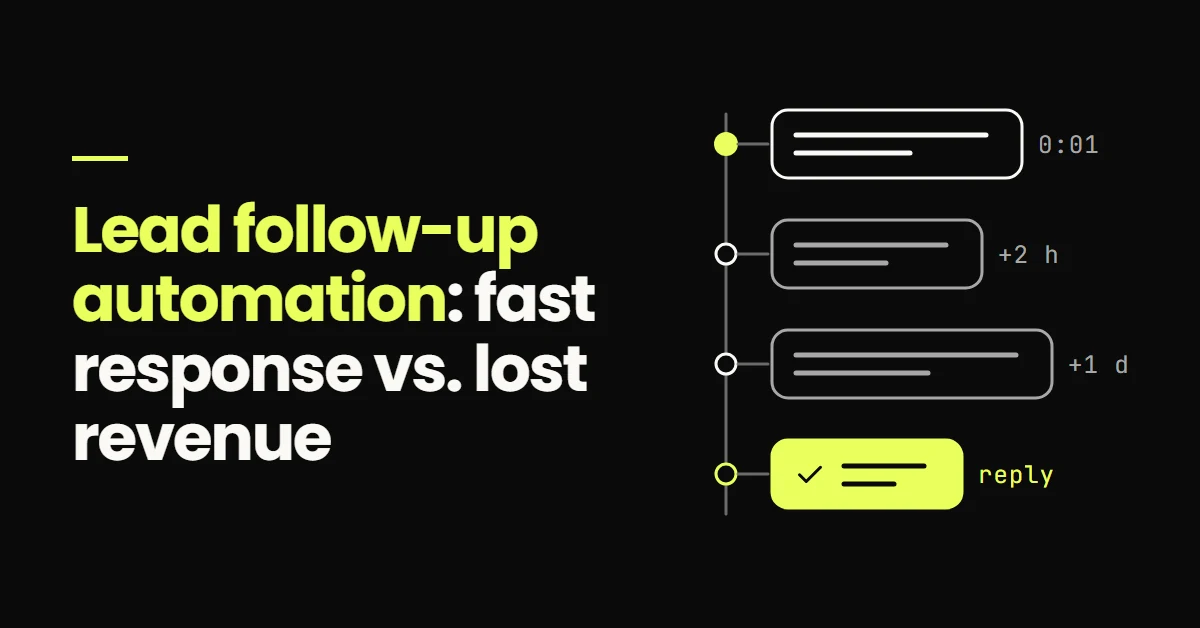
Lead follow-up automation closes that gap. It sends an acknowledgement within minutes of a new enquiry, follows up across SMS and email if the lead does not respond, stops the moment they do, and passes the conversation to a person with the full history attached.
Lead follow-up automation is a set of rules that contacts new leads automatically: an immediate acknowledgement when the enquiry arrives, then a short sequence of texts and emails spaced over days until the lead replies, books or opts out. When the lead responds, automation stops and a team member takes over. It works best for time-sensitive, repetitive contact. It should not handle pricing negotiations, complaints, or anything after a real conversation has started.
Why leads disappear before anyone replies
Response delay is rarely laziness. It is structural. The people who should reply to new leads are the same people doing the work: on a job, with a patient, in a meeting, driving between sites. Enquiries arrive when they arrive, including evenings and weekends, and a notification competes with everything else on a phone.
Meanwhile the lead is not waiting. Someone who needs a service often contacts several businesses in one sitting, and the first useful reply has an obvious advantage.
The best-known research on this is an audit of 2,241 US companies published in Harvard Business Review in 2011. Firms that tried to contact a web lead within an hour were nearly seven times as likely to qualify it as firms that tried even an hour later, and more than 60 times as likely as firms that waited 24 hours or longer. Almost a quarter of the companies audited never responded at all. The study is more than a decade old and looked at online sales leads in general, so treat the exact multiples with care. The practical point holds: the longer a lead waits, the more chances it has to find someone else.
In service businesses, the delay usually comes from a handful of places:
- 01After-hours enquiries Forms submitted at night or at the weekend wait until someone is back.
- 02Notifications nobody owns Alerts go to a shared inbox or several phones, so everyone assumes someone else replied.
- 03One attempt, then nothing A single call to voicemail becomes the whole follow-up effort.
- 04Missed calls with no voicemail Callers who hang up without leaving a message leave nothing to return.
The first reply is only the start
A fast acknowledgement gets attention. It rarely gets a booking on its own. Plenty of leads read the first message and do not answer straight away, because they are still comparing options, waiting to talk to a partner, or simply busy. Without a plan for what happens next, a fast first reply becomes a fast single reply.
This is where manual follow-up usually breaks. The first message goes out, the lead goes quiet, and nobody owns the second, third or fourth attempt. Follow-up automation treats the whole sequence as the job, not the first message.
What lead follow-up automation does
- New leadForm, call or ad
- AcknowledgeWithin minutes
- Follow-upSpaced over days
- ReplyAutomation stops
- Human handoffOwner takes over
How to build an automated follow-up sequence
Immediate acknowledgement
The first message should arrive within a minute or two of the enquiry, from a number or address the lead will recognise, and say three things: the enquiry arrived, who it is from, and what happens next. Ending with one easy question gives the lead a reason to reply.
"Hi Sarah, thanks for your enquiry about a boiler service with Northside Heating. Is this a routine service, or is something not working right now? We will pick this up with you today."
Do not pretend an automated message was typed by someone who "just saw" the enquiry. It is unnecessary, and it backfires when the lead replies to a person who is not there. A clear, useful message from the business is enough.
SMS and email, each with its own job
SMS is short and immediate, which suits time-sensitive messages: the acknowledgement, a quick check-in, a booking link. Email suits anything longer: what the service involves, what to expect, a quote, answers to common questions. Most sequences work best with both, SMS carrying the urgent touches and email carrying the detail. The right balance depends on your customers, so check reply rates by channel after a few weeks rather than assuming.
A multi-step cadence
After the acknowledgement, space follow-ups so they are persistent without being relentless. The table below is a reasonable starting point for a new enquiry, not a benchmark. Adjust it to how quickly your customers usually decide.
| When | Channel | Purpose |
|---|---|---|
| Within minutes | SMS | Acknowledge the enquiry and ask one question |
| Same day | Explain the service, what happens next, and how to book | |
| Day 1 | SMS | Short check-in with a booking link |
| Day 3 | Answer the most common hesitation, such as price range or timing | |
| Day 7 | SMS | Ask whether they still need help, with an easy way to say no |
| Day 14 | Final check-in, then move the lead to a longer-term nurture list |
Stop rules
Every sequence needs rules that end it. Without them, automation keeps messaging people who have already replied, booked or asked to stop, which is the quickest way to make it feel like spam. At a minimum, stop the sequence when the lead:
- 01Replies on any channel The conversation moves to a person straight away.
- 02Books an appointment Booking confirmations and reminders take over instead.
- 03Opts out STOP replies and unsubscribes end every automated message and are recorded on the contact.
- 04Is marked as not a fit A team member can end automation with one change on the record.
Personalisation that does not feel fake
Useful personalisation comes from what the lead told you: their first name, the service they asked about, their area, the form they used. Use those fields to make messages relevant. Avoid inventing familiarity, and set a fallback for every field so nobody receives a message that starts "Hi ,".
Follow-up for the situations that leak the most
Missed calls
A missed call with no voicemail leaves nothing to follow up, unless the phone system triggers a text. Missed-call text-back sends a short SMS to the caller moments after an unanswered call, apologising and asking how you can help. It turns a lost call into a text conversation. For businesses where phone calls are the main channel, voice AI for after-hours and overflow calls is the next step, with clear limits on what it should handle.
Quotes and proposals
A sent quote is one of the most common places for a lead to stall. The customer is weighing it up, and silence feels easier than saying no. A quote follow-up sequence starts when the pipeline stage changes to Quote sent: a check-in after a couple of days asking whether they have questions, a message a few days later addressing the usual concern, and a final message that makes it easy to decline. Every reply goes to the person who wrote the quote.
Leads who replied once and went quiet
Some leads answer the first message and then disappear mid-conversation. Automation should not jump back into a live conversation, but it can create a task for the owner after a set period with no response, so a person decides whether and how to follow up.
Dormant leads
Old enquiries that never converted are still worth a message, provided they agreed to hear from you. A reactivation campaign sends a relevant check-in to leads who went quiet months ago, often tied to a seasonal need or a new service. Send to small batches, route replies to a person, and remove anyone who asks you to stop.
The four states of a lead in follow-up
- ActiveIn a sequence or talking
- WaitingWent quiet, task created
- ColdSequence finished
- Re-engageLater check-in
A reply at any stage moves the lead back to active, with a person taking over
What happens when a lead replies
The reply is the point of the whole sequence, so the handoff has to be as reliable as the automation. When a lead responds:
- 01All automated follow-up stops On every channel, not only the one they replied on.
- 02The owner gets an alert Including the message, the source and the history, in the tool they actually check.
- 03A response time is expected Set an internal target for replying to warm leads in working hours, and a task that escalates if it is missed.
- 04The conversation stays on the record Replies go out from the CRM inbox, so the next person can see what was said.
That last point is where a lot of setups fail. If the salesperson replies from a personal phone, the CRM never sees it, automation cannot tell the lead is being handled, and reporting shows a lead that never converted. Keeping follow-up tied to the pipeline is covered in the guide to CRM automation.
What should and should not be automated
| Task | Automate? | Why |
|---|---|---|
| First acknowledgement | Yes | It has to be fast and consistent, at any hour |
| Follow-up before the first reply | Yes | It is repetitive and easy to forget |
| Booking links and reminders | Yes | Timing matters and the content rarely changes |
| Internal alerts and tasks | Yes | People need a prompt, not another inbox to check |
| Answers about scope or price | No | They depend on the job and need a person |
| Complaints or unhappy customers | No | Automation makes a bad situation worse |
| Messages after a conversation has started | No | The lead expects the person they were talking to |
| Negotiation and final decisions | No | This is the sale, and it belongs to your team |
Once follow-up works, connect it to the rest of the journey, so booked leads flow into appointment booking automation and outcomes feed back into reporting. How those pieces fit together is covered in marketing automation systems that improve conversions.
Consent, opt-outs and deliverability
Automated texting comes with rules, and they vary by country. In the US, carriers require businesses texting from standard 10-digit numbers to register through A2P 10DLC, and federal and state rules govern consent for automated marketing messages. In practice:
- 01Get consent where you collect the number A clear statement or checkbox on the form that they agree to receive texts about their enquiry.
- 02Honour opt-outs automatically STOP and unsubscribe requests end all automated messages and are recorded on the contact.
- 03Send at reasonable hours Hold non-urgent messages until daytime in the lead's time zone.
- 04Identify the business Every message should make it clear who it is from.
This is general guidance, not legal advice. If you work in a regulated industry or across several countries, check the requirements that apply to you. Setting up and testing follow-up like this sits within my marketing automation services.
- Leads usually go missing between enquiry and follow-up, not at the point of saying no.
- Research on online leads links faster contact with far better odds of qualifying a lead, so the first reply should be automatic.
- The sequence after the first message matters as much as the first message, and every sequence needs stop rules.
- When a lead replies, automation stops and a person takes over, with the conversation kept on the CRM record.
- Automate acknowledgement, early follow-up, reminders and alerts. Keep pricing, complaints and live conversations with people.
Sources
- The Short Life of Online Sales Leads, Harvard Business Review, March 2011
- What is A2P 10DLC brand and campaign registration, HighLevel Support Portal
Frequently Asked Questions
Lead follow-up automation is a set of rules that contacts new leads without anyone starting each message by hand. It typically sends an acknowledgement within minutes of an enquiry, then a short sequence of texts and emails spaced over days until the lead replies, books or opts out. When the lead responds, the automation stops and the conversation passes to a team member, with the full message history kept on the lead's CRM record.
As quickly as you can make it consistent, which in practice means an automated acknowledgement within a minute or two, followed by a human reply as soon as someone is available. Research on online sales leads published in Harvard Business Review found that firms contacting leads within an hour were far more likely to qualify them than firms that waited longer. Exact numbers vary by business, but a lead left until tomorrow has had plenty of time to find someone else.
Yes, and they usually work best together. SMS suits short, time-sensitive messages such as the first acknowledgement, a quick check-in or a booking link. Email suits longer content such as service details, quotes and answers to common questions. A combined sequence alternates between them, and a reply on either channel should stop both. Check reply and booking rates by channel after a few weeks to find the right balance for your customers.
Automated follow-up should stop as soon as the lead replies on any channel, books an appointment, opts out, or is marked as not a fit by your team. It should also end when the sequence runs out, at which point the lead can move to a slower nurture list if they agreed to hear from you. Messages that continue after someone has replied or booked are the main reason automation feels like spam.
Yes, as long as they agreed to receive messages from you. A reactivation campaign sends a relevant check-in to leads who went quiet weeks or months ago, often tied to a seasonal need, a new service or a change in availability. Send in small batches so your team can handle the replies, route every response to a person, and remove anyone who asks to stop. Expect some old contact details to be out of date.