Executive Transport Booking System Case Study: XO CABS and Aura Cars
I built a repeatable booking-system foundation used across two UK executive transport operators, helping each business capture journey details, organize enquiries, manage booking status, and support customer communication.
The core structure could be reused, while each operator retained its own website, account, branding, services, data, users, and operating rules.
- BusinessesXO CABS and Aura Cars
- IndustryExecutive transport, chauffeur and airport transfer
- MarketUnited Kingdom
- FocusBooking system, CRM, workflows, customer communication
- ImplementationTwo separate business accounts
- DataKept apart, no sharing between operators
- ReusedStructure and logic, not content
- ConfiguredPer operator, every time
One system foundation. Two separate transport operators.
The interesting part of this project is not either individual build. It is that the same structure could serve two businesses that compete in the same category without either of them sharing anything that matters.
XO CABS
Its own business, running on its own account with nothing shared into the other.
- Own brand
- Own website
- Own customer data
- Own users
- Own services
- Own booking records
- Own communication
Aura Cars
The same list, held entirely separately. Identical structure, no common data.
- Own brand
- Own website
- Own customer data
- Own users
- Own services
- Own booking records
- Own communication
- Booking form logic
- Core CRM structure
- Common field types
- Workflow patterns
- Status logic
- Notification patterns
- Documentation
- Testing process
Repeatable did not mean identical. Each account still required business-specific configuration.
Connecting transport enquiries with a clear booking process.
Executive transport enquiries often include more operational detail than a standard contact form.
A useful request may need pickup location, destination, journey date, time, service type, passenger details, airport information, and a preferred contact method.
The path a booking request travels
- 01Website
- 02Booking request
- 03CRM
- 04Status
- 05Customer contact
- 06Confirmation
- 07Journey outcome
A name and phone number are not enough for a transport booking.
Most contact forms collect enough to start a conversation. A transport enquiry needs enough to price a journey, check availability and allocate a vehicle, which is a different quantity of information entirely.
Half a booking is not a booking
An enquiry missing a date, a destination or a passenger count cannot be quoted. Somebody has to go back and ask, which costs time on both sides and puts the request at risk while it waits.
Details spread across channels
Journey information arriving partly by form, partly by email and partly by phone leaves nobody holding the complete picture.
Unclear where a request stands
Without a visible state, a request that is waiting on the customer looks the same as one waiting on the operator.
No visible owner
A request everybody can see and nobody owns is a request that can sit untouched while each person assumes another has it.
Communication disconnected from the journey
When the messages live somewhere other than the booking, the next person to pick it up starts by reconstructing what was already agreed.
These are the risks the system was designed to reduce. Where the prior state is not documented, this page does not assert that every one of them was occurring
From transport enquiry to organized booking record.
Ten stops. The first three are automatic, the middle four are where the operator does the actual work, and the last three close the record.
- Stop 01WebsiteThe visitor arrives on a service page and finds the booking action.
- Stop 02Booking formJourney information is collected in one place rather than across a conversation.
- Stop 03Contact createdThe customer becomes a record instead of an email in an inbox.
- Stop 04Journey details savedRoute, date, time and requirements attach to that record as structured fields.
- Stop 05Pipeline entryThe request enters a defined process with a starting state.
- Stop 06Team notifiedSomebody is told the request exists, which is what turns a record into an action.
- Stop 07Customer contactThe operator confirms details, availability and price with the customer.
- Stop 08Booking statusThe state moves as the request progresses, so the team can see where it is.
- Stop 09ConfirmationThe operator confirms the journey and the customer is told.
- Stop 10OutcomeThe journey is delivered and the record is closed against a result.
Stops one to three happen without anybody touching them. Everything from stop six onward is a person making a transport decision
Each operator needed a clear route from service discovery to booking enquiry.
Two brands, deliberately not blended. A visitor should never be able to tell that anything behind the two sites has a common origin.
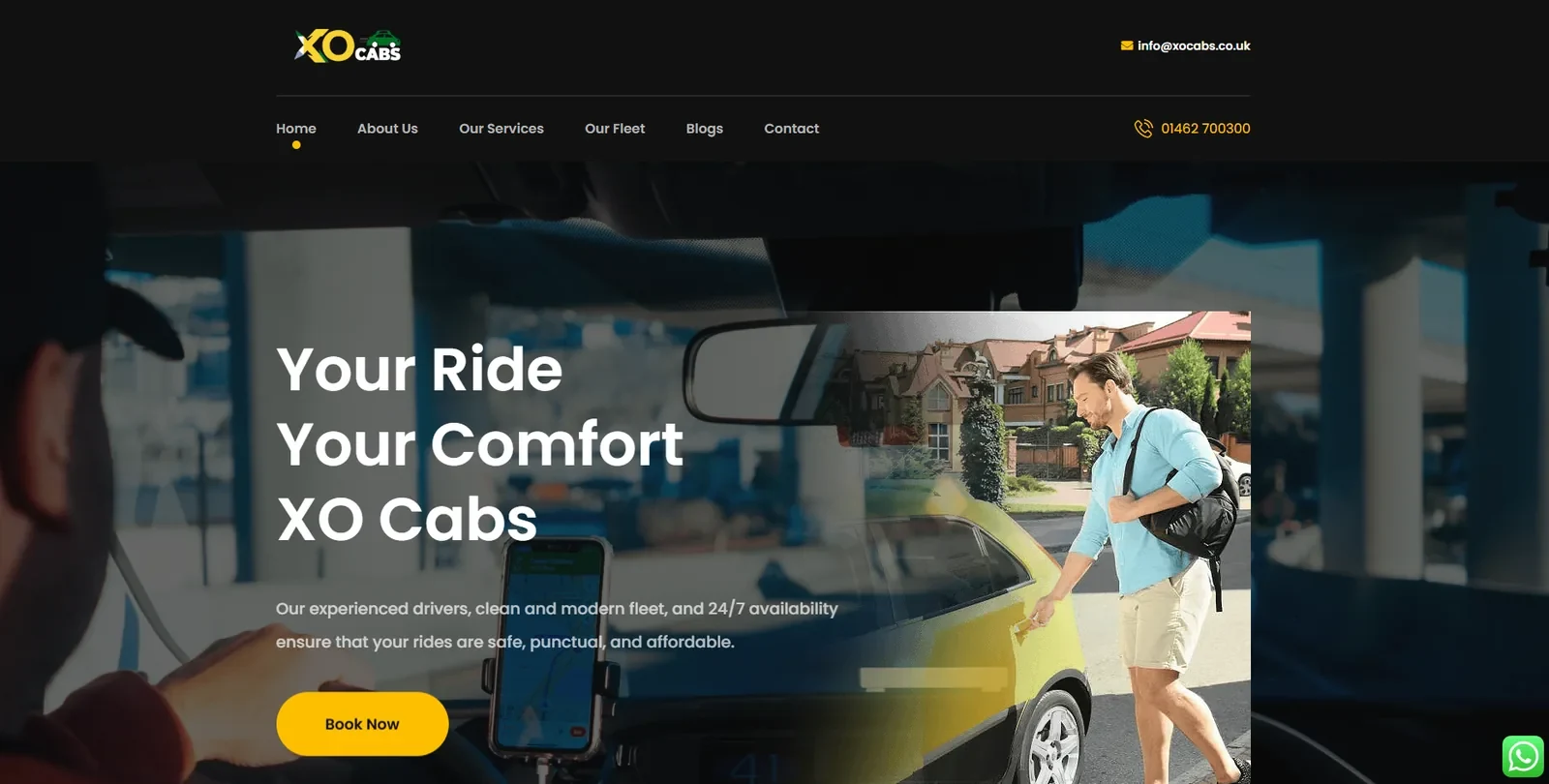
What the XO CABS site puts in front of a visitor
- A services route and a fleet route, separated in the navigation
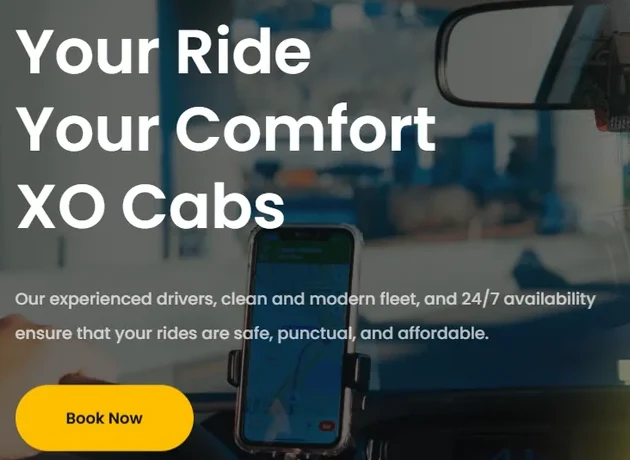
- A single Book Now action on the opening screen
- Phone and email published in the header, not buried on a contact page
- A stated promise covering drivers, fleet condition and availability
- A messaging option alongside the booking action
- An about route, because transport is a trust purchase
The build side is covered under executive transport website development

Before anyone can book, they have to find the operator.
A booking system only matters if demand reaches it. This is the XO CABS search performance for a single three-month window, taken straight from Google Search Console.
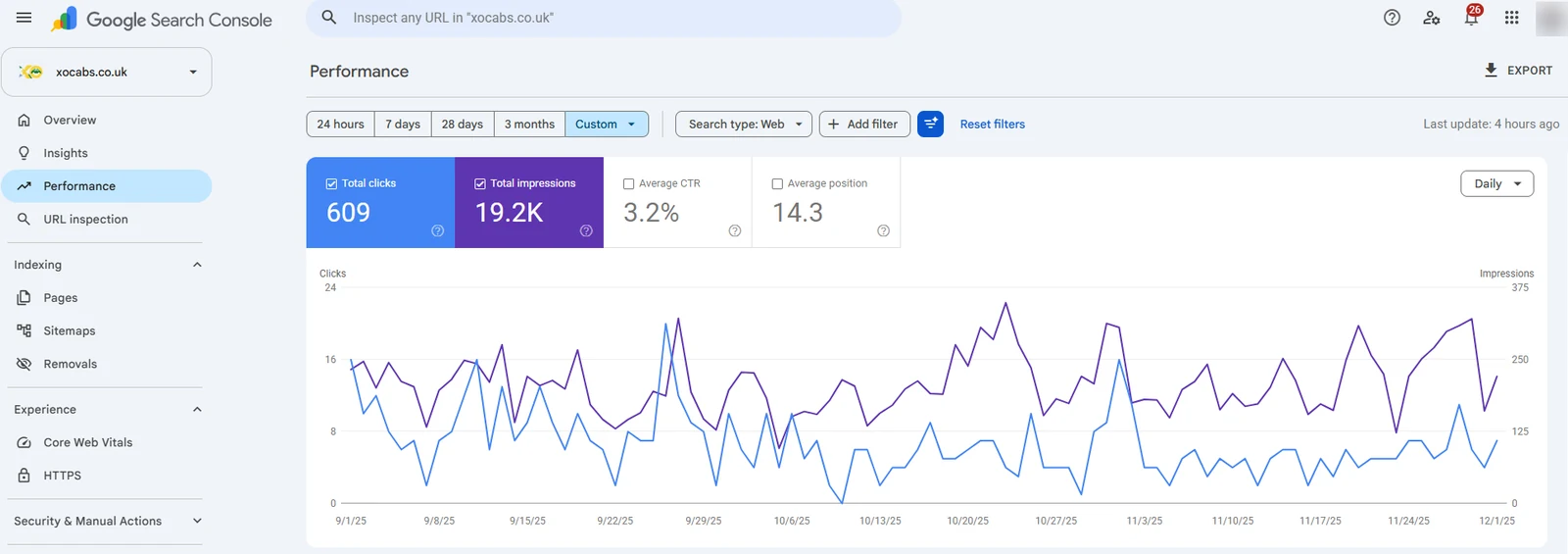


- 01609 clicks from web search across the window.
- 0219.2K impressions across the same window.
- 033.2 percent average click-through rate.
- 0414.3 average position, which is page two rather than page one.
- 05Search was sending real, countable demand to the site the booking system sits behind.
These are the totals for one window. The capture carries no comparison period, so no growth figure, percentage change or before and after is claimed here. An average position of 14.3 is honest ground to build from, not a finished result.
Capture the information needed for the next decision.
Every field should support pricing, availability, confirmation, routing, or customer communication. A field that supports none of those is friction that costs completions and returns nothing.
- Name
- Phone
- Pickup
- Destination
- Date
- Time
- Journey type
- Passengers
- Luggage
- Airport
- Flight
- Return journey
- Vehicle type
- Chauffeur request
- Additional requirements
The four groups exist because they answer four different questions. Who, what journey, what capacity, what service. A form that mixes them is harder to complete and harder to read afterwards.
A booking pipeline should make the current status clear.
A useful pipeline shows whether the request is new, being reviewed, awaiting customer action, confirmed, completed, or closed. The distinction that matters most is which side is holding it up.
Waiting on us
The request has everything it needs and the operator has not acted yet. These are the states worth checking first every morning.
- New enquiry
- Details received
- Quote required
Waiting on them
The operator has done its part and the customer has not replied. Chasing these is a different job from working the group above.
- Customer contacted
- Awaiting confirmation
Settled
The request has an answer, positive or otherwise, and no longer needs daily attention.
- Booked
- Completed
- Cancelled
- Lost
Keep customer information and journey information connected.
These are two different things and conflating them is the most common structural mistake in a booking build. A customer persists. A journey happens once.
Contact information
Details about the customer. Stable across every journey they ever book, and the thing you match a returning caller against.
Holds
- Name
- Phone
- Communication history
- Booking source
- Previous requests
Journey information
Details about the specific booking request. Different every time, and useless if it is stored as prose in a note.
Holds
- Pickup location
- Destination
- Travel date
- Pickup time
- Passenger count
- Journey type
- Airport
- Flight number
- Vehicle preference
- Return journey
- Special instructions
- Booking status
Structured fields make the booking easier to review than relying only on a long message or internal note. A field can be searched, filtered, reported on and read at a glance. A paragraph cannot.
Use automation for repeatable steps, not transport decisions.
The line is simple. Automation moves information and tells people things. It does not decide whether a vehicle is available, what a journey costs, or whether a booking can be accepted.
Tells the operator a request exists. The single most valuable automation in the set, because a record nobody knows about is not a booking.
Confirms the request arrived and sets the expectation that a person will follow. Never states that the journey is booked.
Places the request in its opening state so it appears where the team looks.
Attaches the work to somebody, so ownership is explicit rather than assumed.
Moves the state as the request progresses, driven by what happened rather than by elapsed time.
Chases a request waiting on the customer, and stops the moment they reply.
Sends confirmation once the operator has confirmed, never before.
Reminds the customer ahead of a confirmed journey.
Closes the record and, where used, invites a review.
Automation supported administration and communication. The operator still remained responsible for availability, pricing, confirmation, and service delivery.
Keep the customer informed without sending unnecessary messages.
Every message has to earn its place. On a transport booking the customer is often travelling, so an unnecessary notification is more intrusive than it would be in most other categories.
Acknowledge 01
- Enquiry acknowledgement
- Request for missing details
Progress 02
- Quote follow-up
- Change notification
Confirm 03
- Booking confirmation
- Journey reminder
Close 04
- Completion message
- Review request
Safeguards 05
- Stop on reply
- Status conditions
- Duplicate prevention
Conduct 06
- Business-hour rules
- Opt-out handling
- Correct sender identity
The two right-hand columns are the ones that keep the first four from becoming a nuisance. Stop-on-reply matters most, because a customer who has answered should never receive the chase
A booking should not be treated as confirmed until the operator confirms it.
This is the most important distinction on the page. A form submission is a request for a journey. It is not a vehicle, a driver or a promise, and the system was built so that no message ever implies otherwise.
Booking request
The customer has submitted journey information. Nothing has been agreed and no vehicle is held.
Owner: customer
Quote or review
The operator reviews availability, pricing, and requirements against the journey requested.
Owner: operator
Booking confirmed
The operator has approved the journey and communicated confirmation. Only at this point is anything committed.
Owner: operator
Journey completed
The service has been delivered and the record can be closed against an outcome.
Owner: operator
Submitting the website form does not reserve a vehicle. The acknowledgement message says a person will be in touch, and the word confirmed is reserved for stage three.
The repeatable foundation still needed separate business rules.
Reusing the structure saved the thinking, not the work. Every item below had to be decided again for the second operator, because none of it transfers.
Identity 01
- Brand
- Website
- Service wording
- Contact details
Offer 02
- Services offered
- Vehicle options
- Geographic coverage
- Operating hours
People 03
- Users
- Notification recipients
- Ownership rules
- Escalation
Process 04
- Pipelines
- Booking forms
- Status definitions
- Policies
Voice 05
- Message templates
- Sender identity
- Tone
- Timing rules
Records 06
- Customer data
- Booking records
- Communication history
- Reporting
The shared foundation reduced unnecessary rebuilding while preserving operational separation. It did not make the second implementation free.
Reusable logic should not mean shared customer data.
Two operators in the same category, built by the same person, on the same pattern. That is precisely the situation where separation has to be structural rather than a matter of care.
Account level
Separate accounts
Each business runs in its own account. The boundary is the account itself rather than a convention about which records belong to whom.
No shared accountRecord level
Separate records
Contacts, bookings and communication history belong to one business each. Neither operator can see the other's customers, journeys or conversations.
No shared dataUser level
Separate users and settings
Users, branding, senders and settings are configured per business, so a change made for one cannot reach the other by accident.
No shared accessRepeatable systems should preserve privacy and operational boundaries. What is reused is the pattern, never the content
Test the full journey before relying on it.
A form can appear to work while journey details, notifications, or workflow conditions fail behind the scenes. The submission succeeding tells you almost nothing about whether the booking arrived intact.
What a full pass covers
- Form submission from the live site
- Required field enforcement
- Validation on the fields that matter
- Mobile form behavior, which is where most transport enquiries start
- Contact creation
- Custom field mapping, checked field by field rather than assumed
- Pipeline entry at the correct opening state
- Owner notification actually arriving
- Workflow entry and the conditions that gate it
- SMS delivery
- Email delivery
- Reply handling and stop-on-reply
- Status changes moving the record correctly
- Duplicate contact behavior on a returning customer
- The confirmation path end to end
- The closed outcome states
- Error conditions, including a submission that should fail
A destination that silently lands in the wrong field looks fine on the form and is useless in the CRM.
Checking that a message does not send when it should not is worth as much as checking that it does.
Two accounts means the whole pass runs twice. Shared structure does not mean shared verification.
My contribution across both transport implementations.
A booking system sits very close to the operation it serves, so the boundary needs stating. I built the path a request travels. Everything the request is asking for belongs to the operator.
The booking system
Everything between a customer wanting a journey and an operator having a complete, owned, trackable request in front of them.
Scope
- Website support and development
- Booking form structure
- Customer journey mapping
- CRM setup
- Pipeline configuration
- Custom fields
- Workflow development
- SMS and email setup
- Notifications
- Booking status logic
- Repeatable system structure
- Business-specific configuration
- Testing
- Troubleshooting
- Documentation
- Ongoing support
Outside my scope
The transport business itself. None of this was mine and the system was built assuming it never would be.
Not mine
- Driving
- Dispatching
- Pricing
- Vehicle allocation
- Driver management
- Customer service delivery
- Licensing
- Transport operations
Why the system respects that line
No automation on either account confirms a journey, quotes a price or allocates a vehicle. Those are decisions with a car and a driver behind them, and a workflow has no way of knowing whether either is free.
A clearer process for handling executive transport enquiries.
Stated as operational facts. The only figures published anywhere on this page are the four Search Console totals in section 06. No booking count, revenue, response time, conversion rate or saving is claimed, because none has been measured or approved for publication.
- 01Two operators use the same repeatable booking-system foundation.
- 02Each operator retains its own account and brand.
- 03Booking requests can capture structured journey information.
- 04Customer and journey details remain connected to each other.
- 05Enquiries can enter a defined CRM process rather than an inbox.
- 06Booking status can be made visible to the team handling it.
- 07Communication can be connected with the request it belongs to.
- 08Internal notifications can support follow-up where implemented.
- 09XO CABS recorded 609 clicks from web search in the September to December 2025 window.
- 10Those clicks came from 19.2K impressions at an average position of 14.3.
- 11The same core logic can be configured for separate transport businesses without sharing anything between them.
The system organizes enquiries. It does not guarantee that a booking is accepted, that a vehicle is available, or that any request becomes a journey.
What executive transport businesses can learn from this system.
Six things this build kept returning to, each tied to a decision that was actually made here.
A contact form is not a booking system
Transport enquiries usually require structured journey details.
A request is not automatically confirmed
The operator still needs to review availability, pricing, and service requirements.
Customer and journey data should stay connected
Teams should not have to reconstruct the booking from several messages.
Booking status should be visible
A clear pipeline helps the team understand what needs attention.
Automation should support people
Workflows can acknowledge, notify, and follow up, while people handle operational decisions.
Repeatable systems still need configuration
Each operator has different services, areas, users, messages, and operating rules.
Inside the XO CABS and Aura Cars booking systems.
This is the thinnest evidence set of any case study on this site, and the gallery says so rather than working around it. Select any screenshot to open it full size.
XO CABS website
XO CABS search performance
Services used in this implementation.
A booking system sits across two service lines. The site that collects the request, and the system that does something useful with it.
The system layer. CRM setup, pipelines, custom fields, workflow development, notifications, booking status logic, and customer follow-up automation.
Web design and developmentThe site the request starts on. Booking forms, service pages, mobile experience, and the connection between the form and the system behind it.
AI development with Claude CodeWhere a repeatable build gets documented and templated properly, so the second implementation starts from a known pattern rather than from memory.
Related case studies
Sixth Sense Martial Arts
The same CRM discipline on a single account, with a nine-stage pipeline, six workflows, booking and no-show recovery.
Real estate, retainedPremier Choice International
A multi-year engagement where the website, search work and campaigns had to stay aligned across five calendar years.
All projectsCase studies index
Every published case study, across transport, property, publishing, automotive, ecommerce, hospitality, and own products.
More on how I work is on the about page, and current availability is on contact
Give transport enquiries a clearer path from request to confirmation.
I can review your website, booking forms, customer data, journey fields, CRM, pipeline, workflows, notifications, confirmation process, follow-up, and account structure before defining the highest-priority improvements.