Marketing Automation 12 min read
Automation of Email Marketing Starts With 6 Workflows
Automated email is a set of rules that react to what someone does, not a bigger send list. How the mechanics work, what is worth automating, and why stop rules decide the outcome.
On this page
Most businesses do not have an email problem. They have a timing problem. The right message exists, somebody just has to remember to send it while the person is still deciding.
Automation fixes the timing, and only the timing. Worth understanding the mechanics before buying a platform to run them, because the platform is rarely what goes wrong.
Email marketing automation is the use of triggers, conditions, customer data and workflows to send relevant emails automatically, based on what a person does or where they are in the customer journey. A manual campaign picks a list and sends one message to all of it. An automated workflow waits for an event, checks whether this contact qualifies, sends the message that fits, then decides the next step from what the person does next.
What is email marketing automation?
Email marketing automation is software following rules you wrote, on behalf of every contact individually. Five pieces make up the model.
- 01Trigger The event that starts the workflow: a form submission, a booking, a purchase, a stage change, a date.
- 02Condition The rule that decides who continues: lead source, service requested, whether an appointment exists.
- 03Action An email, usually. Sometimes an SMS, a task, or a field update on the record.
- 04Sequence The ordered actions with timing between them, which is what most people picture.
- 05Segment The group a contact belongs to, which decides what is relevant at all.
The term covers everything from a single welcome email to a journey spanning months. The mechanics are identical at both ends. Only the number of branches changes.
How does email marketing automation work?
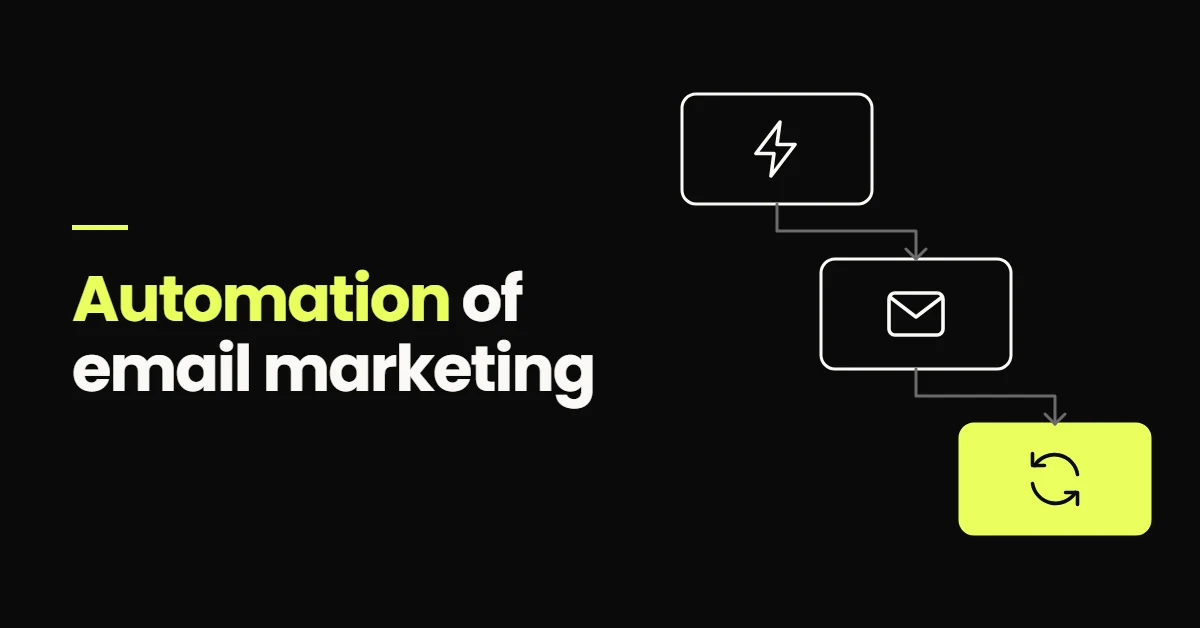
A workflow listens for an event, evaluates a rule, performs an action, then waits to see what the contact does. That loop is the whole system.
Take a service business enquiry. The form creates a record and starts the workflow. The first email sends immediately, confirming the enquiry arrived and what happens next. Then the workflow waits. If the person books, the sequence stops and a booking confirmation takes over. If they do nothing, a second email sends the next day.
The important part is the waiting. A workflow that cannot react to behaviour is a scheduled campaign with extra steps.
The four parts every automated email workflow has
- TriggerThe event that starts it
- ConditionWho qualifies, and for what
- EmailThe message that fits the moment
- Next actionDecided by what they do
What can you automate in email marketing?
New enquiry acknowledgement
The highest value email most businesses are not sending. It confirms the enquiry arrived, sets expectations and buys you time. It should send in seconds, a speed no person holds all week. Why that matters is covered in lead follow-up automation.
Lead nurture while they decide
A short sequence answering what this buyer always asks: what it costs, how long it takes, what happens first, who else you have done it for. Three to five emails over a week or two, each useful on its own.
Appointment confirmations and reminders
Confirmation at booking, a reminder the day before, another on the morning. The most reliable automations in the stack, and they sit alongside booking automation.
Quote and proposal follow-up
A quote with no follow-up relies on the customer to remember you. Two or three scheduled check-ins, stopped instantly by a reply, is usually the cheapest revenue available to a service business.
No-show recovery and reactivation
A missed appointment is a lead interested enough to book. One rebooking email the same day, with a link rather than a request for an apology, recovers a share of them. Past customers are the warmest list you own, and a prompt based on what they bought is a standing automation rather than a quarterly campaign.
Review requests and onboarding
After the work completes, a review request. After a purchase, onboarding that prevents five support emails you would otherwise answer one at a time. Build the acknowledgement and the reminders first: they fail loudest when missing.
Email automation versus email campaigns
Both have a place. The mistake is using one where the other belongs, usually broadcasting to a whole list when the message only made sense to the eleven people who enquired last week.
| Manual campaign | Automated workflow | |
|---|---|---|
| Trigger | A person decides to send it | An event the contact caused |
| Timing | The same moment for everybody | Relative to each contact |
| Audience | A list chosen now | Whoever meets the conditions, whenever they do |
| Personalisation | Usually name and segment | Source, stage, service, appointment status |
| Frequency | Scheduled or ad hoc | Continuous, running in the background |
| Purpose | News, offers, announcements | Follow-up, nurture, reminders, recovery |
A newsletter is a campaign. A quote chase is a workflow. The same platform sends both, which is why the distinction is easy to lose.
What makes email automation effective?
Relevance and timing, in that order. Copy matters less than people expect once those two are right.
- 01Relevance A quote follow-up should not read like a newsletter.
- 02Timing Immediate where immediacy matters, spaced where thinking time matters, never at three in the morning.
- 03Segmentation Different enquiry types get different sequences.
- 04Clean data Source, service and stage captured at entry, or conditions have nothing to evaluate.
- 05One purpose per email Emails that ask for three things get none of them.
- 06A handoff to a person When a real conversation starts, the automation gets out of the way.
Why exit conditions matter more than the emails
An exit condition removes someone from a sequence, and it is what is missing from automations that make a business look careless. If they reply, stop everything. If they book, the nurture ends and the appointment sequence begins. If they buy, move them to onboarding. If they unsubscribe, honour it everywhere.
Every workflow needs a maximum length too. A sequence with no end keeps contacting people who already decided, which costs goodwill and your sending reputation at once.
The best automation knows when to send. It also knows when to stop.
Email marketing automation and your CRM
The CRM is what makes automated email specific. An email platform alone knows an address and maybe a name. A CRM knows the context.
- 01Pipeline stage New, quoted, booked, won or lost. Each deserves different messaging.
- 02Lead source A referral and a cold ad click need different first emails.
- 03Appointment status Booked, attended, cancelled or missed, each with its own follow-up.
- 04Service requested The strongest segmentation most businesses collect and never use.
- 05Last contact date The basis of every reactivation workflow worth running.
Capturing that data reliably is a separate job from writing emails, and the one worth doing first. CRM automation covers how records and stages stay accurate without anyone retyping an enquiry.
Email automation for a service business
For most service businesses the journey is short and repetitive, which is what automation does well.
-
0:00
Enquiry arrives The form creates a CRM contact with source and service attached.
-
0:01
Acknowledgement sends What happens next, who will be in touch, and a booking link for anyone ready now.
-
+1 day
Follow-up email The questions this enquiry type always asks, answered early.
-
+3 days
Booking prompt One clear call to action, stopped by a reply or a booking.
-
On booking
Confirmation and reminders Immediately, the day before, and on the morning. The nurture exits here.
-
After
Post appointment workflow A quote chase, onboarding, a review request or a rebooking email.
SMS belongs in the same structure for time sensitive steps, which is how marketing automation for service businesses treats both channels. Email carries the detail. SMS carries the reminder.
Where automated email does the work in a service journey
- New leadCaptured with source and service
- Follow-upSent on time, every time
- BookingConfirmed and reminded
- CustomerOnboarded, reviewed, reactivated
Three email marketing automation examples
An appointment driven practice
A clinical practice books most of its revenue through appointments, so the workflow is built around the calendar. Acknowledgement, booking prompt, confirmation, two reminders, a same day rebooking email for a no-show, then a recall prompt at the right interval.
A professional services firm
Longer decisions, fewer enquiries, higher value. Immediate acknowledgement, then a short sequence answering process questions: how the engagement works, what the first month involves. After a proposal, a separate workflow follows up on a fixed schedule, stopped by any reply.
Past customer reactivation
A business with a repeat purchase cycle runs a standing workflow on last contact date and service type. The email references what they bought and offers the obvious next step. Nothing to plan each quarter, because the rule only contacts people whose interval has elapsed.
None of these need a large list. They need accurate data and a defined journey, the same pattern as the martial arts automation case study.
What email marketing automation should not do
Automation amplifies whatever process it is given. These failures are worth designing out.
- 01Keep sending after a reply The clearest signal that nobody reads the inbox those emails came from.
- 02Email people who never consented A legal requirement in most markets and a deliverability requirement in all of them.
- 03Run on bad data Wrong name, wrong service, wrong stage. One mistake undoes the whole sequence.
- 04Send everyone the same thing If it would read identically to every contact, it is a campaign in a workflow costume.
- 05Replace a difficult conversation Complaints and negotiations belong to a person.
- 06Ignore deliverability Volume without authentication ends in spam, including the emails people wanted.
Email deliverability decides whether any of it works
Automation increases how much you send, which makes the technical side matter more. The current requirements are published rather than guessed at.
Google requires every sender to Gmail accounts to set up SPF or DKIM authentication, keep valid forward and reverse DNS records, transmit over TLS, and keep spam rates in Postmaster Tools below 0.3 percent. Senders of more than 5,000 messages a day must also publish a DMARC policy, align the From domain with SPF or DKIM, and support one-click unsubscribe.
The operational habits are simpler: send to people who asked, remove hard bounces, honour unsubscribes immediately, and keep sequences short enough that nobody is still receiving them after they stopped caring. Exit conditions are a deliverability control as much as a courtesy.
Sources
- Email sender guidelines, Google Workspace Admin Help, on SPF, DKIM, DMARC, spam rate thresholds and one-click unsubscribe, checked October 2026
How to build your first automated email workflow
One workflow, built properly, teaches more than a platform comparison.
-
1 to 3
Goal, trigger, audience The outcome, the event that starts it, and who qualifies.
-
4 to 5
Messages and timing Each email does one job, and the gaps match how people decide.
-
6 to 7
Conditions and exits Branch on what matters, and write the stop rules first.
-
8
Test with real records Run yourself and a colleague through it, exits included.
-
9 to 10
Monitor and improve Watch replies, bookings and unsubscribes for a month, then change one thing at a time.
Choosing where to build it
Tools fall into three categories. An email platform handles lists, broadcasts and simple sequences, which is enough when email is the whole job. A CRM with automation keeps records, pipeline and messaging together, which matters when sales context drives the message. A marketing automation platform runs workflows across email, SMS and booking. Choose on volume, CRM context, whether appointments are involved, and the reporting you need. For service businesses running enquiries, bookings and follow-up in one place, GoHighLevel is the platform I build on most often.
Email automation is not a channel with its own strategy. It is one layer of a journey that starts with a search or an ad, runs through the website, the enquiry and the CRM, and ends with a booked job and a record of where it came from. Designing those layers around what the business does next is my automation work, and the measurement side is set out in marketing automation systems that improve conversions.
- Email automation is triggers, conditions and workflows reacting to behaviour, not a bigger send list.
- Automate the predictable messages first: acknowledgement, appointment reminders and quote follow-up.
- Exit conditions decide how the system feels. Reply, booking, purchase and unsubscribe must all stop it.
- CRM data makes an automated email specific. Without stage and source you can only personalise a name.
- Authentication and list hygiene are not optional. Google publishes the thresholds every sender must meet.
Frequently Asked Questions About Email Marketing Automation
The automation of email marketing is the use of triggers, conditions and workflows to send relevant emails automatically, based on what a person does or where they are in the customer journey. Rather than choosing a list and sending a campaign, you define a starting event, rules about who qualifies, the messages that follow, and the conditions that stop the sequence.
It works as a chain of four parts: a trigger, a condition, an action and a next step. The trigger is an event such as a form submission, a booking or a stage change. The condition decides whether this contact qualifies. The action is usually an email. The next step depends on what the person does, which is why a good workflow branches and stops.
Automate the messages that are predictable, repetitive and time sensitive: the acknowledgement of a new enquiry, the follow-up sequence while a lead decides, appointment confirmations and reminders, quote follow-up, no-show recovery, and a review request after the work is done. Anything needing judgement, negotiation or an apology should stay with a person.
No. Email automation sends messages based on rules. CRM automation manages records, ownership, pipeline stages and tasks, and email is one of the actions it can take. They overlap because the CRM holds the data that makes email relevant, such as lead source, stage and appointment status. Without that data you can only personalise a first name.
It replaces the predictable part, not the judgement. Automation is better than a person at replying within seconds, reminding somebody about an appointment, and chasing a quote on a schedule nobody forgets. It is worse at reading a difficult reply or deciding when to stop trying. Use it for the sequence, with a clean handoff when a real conversation starts.
A common one for service businesses: a website form creates a contact, an acknowledgement sends immediately, a second email follows the next day answering the usual questions, and a third arrives three days later with a booking link. If the person books or replies, the sequence stops. If nothing happens by day ten, they move to a slower nurture list.